

Think of your site’s search bar as a direct line to your most motivated customers. It’s not just another button on your homepage. It’s your best salesperson, working 24/7, ready to close a deal. When a shopper uses your ecommerce website search, they aren't just browsing, they're telling you exactly what they want to buy.
An optimized search turns these high-intent visitors into buyers by acting like an expert personal shopper, guiding them straight to a purchase.
There are two kinds of visitors on your site: browsers and buyers. Browsers casually click through categories, seeing what catches their eye. Buyers, on the other hand, head straight for the search bar. They have a product in mind and are ready to pull the trigger. They are, without a doubt, your hottest leads.
When you start treating your search function as a core part of your sales strategy, your entire site transforms. It stops being a passive digital catalog and becomes an active, helpful selling environment. A great search experience builds trust and makes customers feel like you get them.
So, what happens when your best salesperson is asleep on the job? A poor search function is like an unhelpful store employee who just shrugs when you ask where to find something. It's frustrating, and modern shoppers have zero patience for it.
When customers can't find what they're looking for, they don't stick around to solve the mystery. They just leave. And they probably won't be back.
This isn’t just an inconvenience; it’s a direct hit to your bottom line. We see it all the time:
This is why we always tell clients to focus on the fundamentals first. Implementing essential ecommerce site search best practices can turn your search bar from a liability into your most effective sales tool. This isn't just about tweaking a feature; it's about plugging a massive leak in your sales funnel.
It's one thing to talk about a "good" or "bad" search experience, but what does that actually look like on your dashboard? The table below breaks down how search performance directly influences the metrics that matter most. It’s a stark comparison that shows why investing in search isn't a cost. It's a high-return investment.
As you can see, the difference is night and day. An optimized search experience doesn't just prevent negative outcomes. It actively drives positive growth across your most important KPIs.
The data speaks for itself. Across the industry, users who engage with the search bar convert at 3-5 times higher rates than those who don't. With global ecommerce sales projected to hit $6.42 trillion in 2025, even a small lift in search conversion can translate to millions in new revenue. This isn't just theory. AI search platform insights from Netcore Unbxd confirm that optimizing your ecommerce website search is one of the highest-impact moves you can make.
An optimized search is the difference between a visitor and a customer. It's the moment your website stops being a simple catalog and starts actively selling to someone who is ready to buy.
By putting real effort into your site's search capabilities, you're making a direct investment in converting your most valuable traffic. The numbers are clear: shoppers who search are on a mission. Your job is to make sure your website helps them complete it.
That simple search bar on your favorite ecommerce site? It might look unassuming, but the technology behind it has gone through a radical transformation. It’s evolved from a rigid, old-school librarian into something closer to a mind-reading personal shopper. Understanding this journey from clunky keywords to sophisticated AI is key to figuring out why some search experiences feel magical, while others just fall flat.
This whole ecosystem is designed to connect what a customer wants directly to your bottom line.
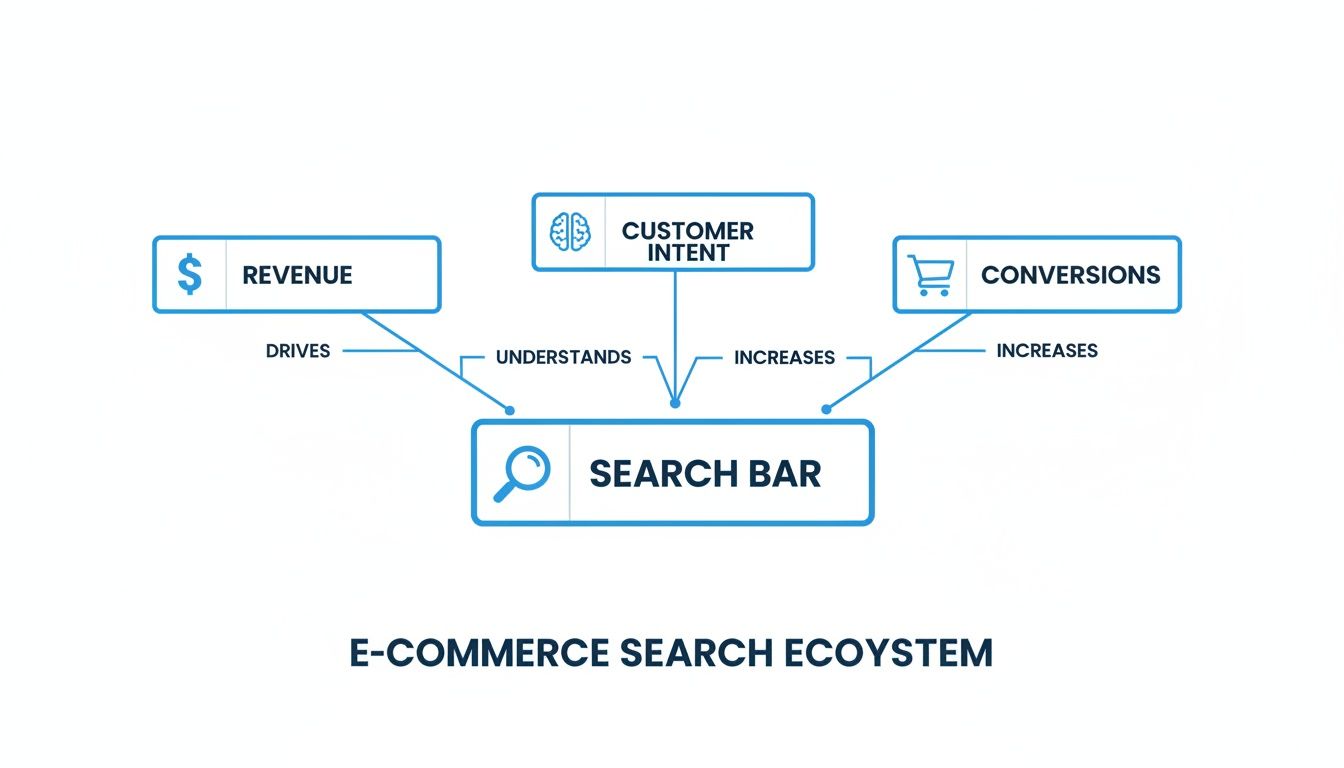
As you can see, the search bar isn't just a feature. It's the central hub linking a shopper's intent straight to revenue and conversions. It’s a critical driver for the entire business.
In the early days, site search was all about keyword matching. This approach was brutally simple. If a shopper typed "blue running shoes," the system would scan product titles and descriptions for those exact words, in that exact order. A product titled "running sneakers in navy"? It might not even show up.
The problems with this became obvious very quickly:
This rigid method forced people to guess the exact terminology the store used. It was a clunky, frustrating, and often failed experience.
The next big step forward was semantic search. This was a major improvement because it was the first real attempt to understand the meaning behind the words. Think of it as upgrading from a rigid librarian to a much smarter one who understands context.
Suddenly, search could figure out that "men's trousers" and "pants for guys" were describing the same product. It used synonyms, context clues, and a better grasp of language to deliver far more relevant results. If you searched for a "summer dress," it knew to look for products with attributes like "lightweight," "floral print," or "sundress," even if you never typed those specific words.
By focusing on the user's intent rather than just the literal keywords, semantic search made the ecommerce website search experience much more intuitive and forgiving. It was a huge step toward making online shopping feel more human.
Today, we're in the age of AI and vector search, and it’s a completely different ballgame. If semantic search is a smart librarian, AI search is like having a personal stylist who intuits your tastes, needs, and even unspoken preferences.
Instead of just matching words or concepts, AI and vector search convert everything, both your search query and your products, into complex numerical representations called "vectors." It then places these vectors on a massive, multi-dimensional map of ideas.
Imagine a huge conceptual space where "red high-heeled shoes" is located right next to "stiletto pumps" and "party footwear," but miles away from "hiking boots." This allows the AI to understand abstract relationships and even visual similarities. A shopper could type "shoes that look like these," upload a picture, and the AI could find visually similar items.
To really get a sense of how platforms are moving beyond simple keywords, it’s worth looking under the hood of major retailers. For instance, the Amazon Cosmo Algorithm Explained gives a peek into how the biggest players think about product ranking in the AI era. You can learn more about how this is changing the game by exploring https://nanopim.com/post/what-is-generative-engine-optimization.
But here’s the catch. This incredible technology relies on one critical thing: clean, structured, and rich product data. An AI can only be as smart as the information it’s given, which is why a PIM is the non-negotiable foundation for any modern search strategy.
Having the smartest search technology under the hood is only half the battle. If the user experience is clunky, confusing, or just plain ugly, even the most powerful AI won’t save your conversion rates.
Designing a great search experience is all about making it dead simple for customers to find what they want, fast. It starts with the search bar. This isn't just a box to type in; it's the front door for your most motivated shoppers. A good design invites them in, while a bad one tells them you don’t really care if they find anything.

The first rule of ecommerce website search is that people need to see it. Immediately. Don't make your customers hunt for it. The only place for it is right in the header, accessible from every single page on your site.
Think about how the major retailers do it. Their search bar is often full-width or slapped right in the center of the page, drawing your eye instantly. Use clear placeholder text like "Search for products..." and a magnifying glass icon to make its purpose obvious.
A few quick design tips:
The moment a shopper starts typing, the real magic should kick in. Autocomplete, also known as predictive search, is a non-negotiable feature. It needs to suggest relevant products, categories, and search terms in real-time as the user types.
This does a lot more than just save a few keystrokes. It guides users toward products that actually exist in your store, prevents typos that lead to crushing "zero results" pages, and exposes them to popular items they might not have thought of. One study even found that using autocomplete can boost sales by as much as 24%.
A great autocomplete feature is like a helpful store clerk leaning over your shoulder, gently guiding you to the right aisle before you even finish your question. It builds confidence and momentum.
But be warned: a bad autocomplete is worse than none at all. If your suggestions are slow or irrelevant, you’re just creating frustration. This is where the quality of your product data is absolutely critical.
No matter how good your search is, shoppers will occasionally look for something you don't have. The dreaded "zero results" page is a notorious conversion killer, but it doesn't have to be a dead end.
Instead of a blunt "No products found," turn this page into a helpful guide. This is your chance to recover a potential sale. A search for a "purple widget" on a site that only sells blue and green ones shouldn't just come up empty. A smart search engine will offer alternatives.
Try these strategies:
The goal is to keep the conversation going and stop them from bouncing straight to a competitor.
Once a shopper gets a list of search results, the next job is helping them narrow it down. This is where filters and facets come in, and they are the single most important tool for turning a huge list of products into a manageable shortlist.
Facets are just product attributes you can filter by, like things like size, color, brand, or price. For a search like "women's boots," a shopper should be able to instantly filter by "Size 8," "Black," and "Under $100." This is flat-out impossible without well-structured product data. Every single filter you want to offer needs a corresponding attribute attached to your products.
This is a key area where organizing your information with dedicated tools pays off. The ability to present clean, consistent facets is directly tied to whether a user can actually find what they're looking for. You can see how this works in our guide on AI-powered digital asset management.
This is more than a convenience; it's a reflection of how people shop today. A staggering 54% of all product searches now begin on Amazon, where filtering is central to the experience. When you look at the data, site search users convert 3-5x higher than average, and that success is fueled by the ability to quickly and easily refine results.
We’ve talked a lot about powerful search tech and slick user interfaces, but let's be honest. None of it matters without the right fuel. The real secret to a high-performing ecommerce website search isn't some fancy algorithm. It's your product data.
Even the most advanced AI is completely useless if the information it’s working with is messy, incomplete, or just plain wrong.
Think of it this way: your search engine is a world-class chef. You can give that chef the best kitchen on the planet, but if you hand them a rusty can of beans and stale crackers, you aren't getting a gourmet meal. For your search engine, high-quality ingredients are everything. And those ingredients are clean, structured, and comprehensive product data.

This is where it all comes together. Your product data is the foundation. Without a solid one, the entire search experience collapses.
So, what does "good" data even mean? It really boils down to two things: a logical taxonomy and a smart attribute strategy.
A product taxonomy is the digital blueprint for your store. It’s the hierarchy you use to organize everything, like the aisle signs in a physical shop. A simple one might be Apparel > Men's > Shirts > T-Shirts. This structure doesn’t just help customers browse. It gives your search engine the context to understand how products relate to each other.
An attribute strategy is all about capturing the specific details that make each product unique, like size, color, material, brand, and features. These are the building blocks for your search filters and are absolutely critical for giving customers relevant results.
A great search experience isn’t about guessing what a customer wants. It's about having such rich, organized data that you can precisely match their needs with the perfect product, every single time.
This is what lets a search for "waterproof jacket" show products tagged with the attribute "water-resistant" or even "Gore-Tex." Without these specific data points, the search engine is just blindly guessing based on keywords.
Trying to manage all this data across thousands of products and endless spreadsheets is a recipe for disaster. This is where a Product Information Management (PIM) system comes in. A PIM acts as a centralized hub, a "single source of truth," for all your product information.
Instead of data being scattered everywhere, a PIM brings it all together in one organized place. This solves the data chaos that cripples most search systems before they even get off the ground. For anyone serious about ecommerce, understanding the fundamentals of product information management is non-negotiable.
A modern PIM system like NanoPIM is built to solve these exact problems with features like:
A PIM ensures the data fueling your search engine is consistent, accurate, and complete. End of story.
To build a world-class search, you need to be intentional about the data you collect. Start by focusing on the essential attributes customers use to make decisions, then expand to include advanced, AI-friendly attributes that can anticipate user needs.
Here’s a practical checklist to guide your data gathering within your PIM.
This checklist isn't just about filling fields. It's about building a deep, nuanced understanding of your products that your search engine can use to deliver incredibly precise results.
One of the biggest mistakes I see companies make is treating site search as a purely technical problem for the IT department. The reality is, building a great search experience is a team sport.
Your team's collective knowledge is a goldmine. You need to get everyone involved.
When these teams collaborate to define the product taxonomy and attribute strategy within a PIM, the result is a rich dataset that does more than just power a search bar. It creates a better customer experience across the board and becomes the engine that drives conversions.
Getting a new site search system live is a great first step, but it’s just the beginning. The real work starts now. How do you actually know if it's making a difference? To find out, you need to look past the obvious metrics like overall conversion and dig into the data that shows how customers are really using your search.
These analytics are more than just numbers on a screen. They’re a direct line into your customers' thoughts, revealing what they’re looking for, where they’re getting frustrated, and even what products they wish you carried. Think of it as a constant feedback loop, pure gold for your merchandising and marketing teams.
A high-level conversion rate is nice, but it doesn't tell you anything specific about your search performance. You need to zero in on a few search-specific Key Performance Indicators (KPIs) to get the real story. Tracking these metrics helps you find the weak spots and make changes that matter.
Here are the essentials every ecommerce team should have on their dashboard:
Each of these numbers tells a piece of a bigger story. A high exit rate means you’re losing motivated buyers. A high null results rate points to easy sales you’re missing out on. And a high query refinement rate is a clear sign of a frustrating, clunky user experience.
Your site search logs are one of the most valuable, under-utilized sources of customer insight you own. The queries themselves are raw, unfiltered expressions of what your customers want, in their own words. When you start analyzing what people are typing, you’ll find a treasure trove of actionable information.
Analyzing search query reports isn't just a technical task. It's market research happening in real time, directly from the voice of your customer.
For instance, are shoppers constantly searching for a brand you don't stock? That’s a powerful signal for your buying team. Are they using terms like "eco-friendly" or "vegan" that don't appear in your product data? That's your cue to update your attributes and marketing copy. This data helps you close the gap between the language you use and the language your customers actually speak.
Improving search isn’t a project you complete; it's a process you commit to. It’s an ongoing cycle of tweaking, testing, and optimizing based on the data you're pulling in. A huge part of this process is leaning into personalization, with the goal of making every search feel like it was designed just for that user.
Hyper-personalization isn't just a gimmick; it's a proven way to drive sales. Shoppers shown personalized results are 2-3 times more likely to buy. This is why 65% of brands see higher conversions after implementing it, and why 60% of shoppers say they’ll come back for more tailored experiences. With ecommerce projected to make up 21.1% of all retail sales by 2026, it's clear that smart, intent-driven search is non-negotiable for growth. If you want to dive deeper, you can learn more about these site search trends and their impact.
By tying your search analytics together with user data, you can build a search experience that’s truly dynamic and responsive. This loop of continuous improvement is what turns your search bar from a simple utility into an engine for long-term growth.
Turning your site search from a clunky tool into a sales machine feels like a massive undertaking. It doesn't have to be.
The secret is breaking the project into clear, manageable steps. This isn't about a one-shot, big-bang launch. It's a phased approach that lets you build momentum and see results quickly.
It all starts with a hard look in the mirror. You can't know where you're going until you know exactly where you stand.
Before you even think about new tech, you need to get a clear picture of what's working and what's broken. This first phase is all about auditing your current search performance and, most critically, the quality of your product data.
This data is the bedrock of everything that follows.
Here’s your checklist for this phase:
This isn't about fixing anything just yet. It's about gathering the cold, hard facts you need to justify the project.
Once you’ve stared your data weaknesses in the face, it’s time to fix them. The single most effective way to do this is to create a single source of truth for every piece of product information. This is where a Product Information Management (PIM) system becomes non-negotiable.
Centralizing your data isn't just a housekeeping task. It's the strategic move that unlocks everything else, including advanced search, personalization, and a rock-solid customer experience on every channel.
You'll trade in your tangled web of spreadsheets for one clean, controlled environment where your product content can finally shine.
With your data house in order, you can finally plug in a modern search engine. Now you can confidently choose a semantic or AI-powered solution, knowing you have the high-quality fuel it needs to run.
Because all your data is clean and structured in a PIM, the integration itself becomes dramatically simpler and faster. The new search tech will actually work the way it's supposed to.
Here's the truth: world-class search is never "done." It’s not a set-it-and-forget-it project.
This final phase is about building a habit of continuous improvement. You'll need a process for regularly reviewing search analytics, spotting new customer trends in the query data, and constantly enriching your product information.
This feedback loop is what separates the good from the great. It’s how you turn raw customer insights into skyrocketing conversions and a massive return on your investment.
So, you know your site search needs work, but you're not sure where to even start. We get it. Here are some quick answers to the questions we hear most often from retailers trying to crack the search code.
Before you even think about fancy new search tech, you need to look at your product data. A powerful search experience is always built on a foundation of clean, complete, and well-structured information.
Start by auditing what you already have. How good are your product titles? Are the descriptions helpful? What about your attributes? A PIM system is the perfect place to centralize everything and get an honest look at your data's quality. This is, without a doubt, the most critical starting point for any real improvement.
The price tag can vary, but modern AI search is way more accessible than most people think. The investment really has two parts: the search technology itself, and just as important, the effort you put into organizing your product data.
The key is to look for solutions with transparent, usage-based pricing. This model allows you to scale up without a massive upfront license fee, tying your costs directly to your business activity.
This approach makes it a much more manageable and predictable investment, letting you benefit from powerful AI without breaking the bank.
Absolutely. You don't need a massive, expensive redesign to see significant results. The most impactful changes often happen behind the scenes.
Start by getting your product data in order using a PIM. Once that data is enriched and structured, you can feed it into your existing search tool, which often delivers an immediate boost in relevance. From there, you can focus on smaller UX wins like better filters or smarter autocomplete. It’s all about making steady, data-driven improvements.
Ready to build a search experience that actually converts? NanoPIM gives you the tools to centralize, enrich, and optimize the product data that fuels a world-class search. See how it works.


