

A customer orders a winter coat from your site on Monday. By Friday, your support team has a ticket. The item that arrived is lighter than expected, the size details were listed in the wrong unit, and the fabric description does not match the label on the product.
That kind of problem rarely starts with one dramatic mistake. It usually comes from small data issues stacking up. A supplier sheet uses one format, your ERP uses another, a marketplace template strips a field, and someone fills in the blanks too fast because the product launch cannot wait.
In eCommerce, bad data does not stay in the back office. It shows up in search filters, product pages, ads, feeds, returns, reviews, and customer trust. That is why knowing what is data validation matters so much. It is not just an IT term. It is one of the subtle systems that keeps revenue, operations, and brand credibility from drifting off course.
A lot of teams think of product data problems as annoying but manageable. Then the errors hit something customer-facing.
A coat becomes a jacket. A phone case fits the wrong model. A listing says “set of 4” on your site but “single unit” on a marketplace. None of those mistakes feels huge when viewed inside a spreadsheet. They feel huge to the customer who bought the wrong thing.
The operational damage spreads fast.
This is not unique to retail either. In other sectors, the stakes can be even higher. Work around digitizing medical records in healthcare is a useful reminder that once records become digital, quality controls matter as much as speed. The same lesson applies to product catalogs. If the source data is messy, the system only spreads that mess faster.
A lot of new managers try to solve this by asking the team to “be more careful.” That rarely works for long. Care helps, but scale beats good intentions every time.
The better move is to treat product data quality as an operating discipline. If you need a practical starting point, this guide on https://nanopim.com/post/managing-data-quality lays out the bigger picture behind reliable catalog operations.
Tip: If the same type of support ticket keeps coming back, check the product data before you blame fulfillment or customer service. The issue often started much earlier.
Data validation is the process of checking whether data is accurate, complete, sensible, and usable before it moves into the next system or gets published.
Imagine a club bouncer. The bouncer is not there to ruin the night. The bouncer checks whether each person meets the rules for entry. Wrong ID, wrong age, wrong guest list, wrong dress code. No entry.
Data validation does the same thing for product information.

A validation rule might ask:
The point is not to create flawless data in some abstract sense. The point is to make sure the data is fit for use.
A marketplace feed needs different checks than an internal analytics table. A product title for Google Shopping needs different checks than a supplier cost field. Good validation starts by asking what the data must do next.
That is why data validation sits so close to data quality. Data quality is the broader outcome. Validation is one of the main ways teams get there. If you want the distinction spelled out clearly in a product-data context, https://nanopim.com/post/what-is-data-quality is a useful companion read.
In statistical practice, it helps to separate random errors from systematic errors. Random errors happen by accident and are expected to average to zero over time. Systematic errors happen frequently and consistently, such as reporting consumption in kilograms when grams were requested, as explained by Decube’s overview of data validation practices at https://www.decube.io/post/data-validation-essential-practices-for-accuracy.
For catalog teams, that distinction matters.
A random error is a merchandiser mistyping one sleeve length.
A systematic error is far worse. That is when an entire supplier feed maps dimensions into the wrong unit, or every “navy” color becomes “black” because of a transformation rule upstream. One-off mistakes are painful. Repeated rule-driven mistakes can contaminate thousands of records.
Many teams start with simple checks, and that is fine. But validation is not limited to “required field” rules.
An advanced method is Benford’s law, developed by physicist Frank Benford. It detects fabricated or manipulated data by analyzing the distribution of leading digits in datasets. Falsifiers typically cannot replicate Benford’s distribution naturally, so strong deviations can indicate potential manipulation, as noted in the same Decube reference above.
You probably will not use Benford’s law for a clothing catalog. Still, it shows an important point. Validation is not just clerical checking. It can be a serious quality-control discipline.
When I explain validation to new catalog managers, I usually anchor it to one product. Let’s use a laptop. It keeps the conversation practical.
You have a record with a model number, screen size, brand, price, warranty, color, condition, and compatibility details. Five validation checks do most of the heavy lifting.
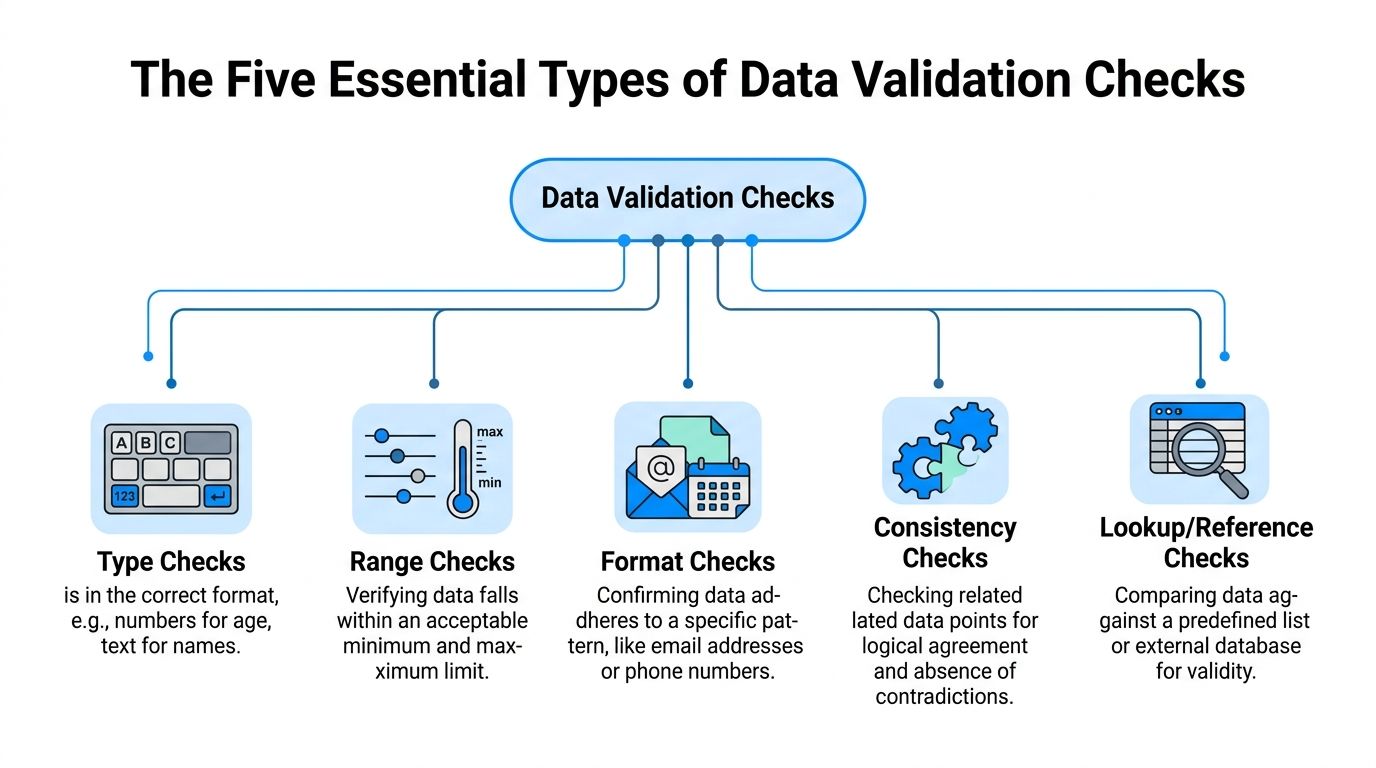
A type check asks whether the value is the right kind of data.
If “screen size” should be numeric, then “fifteen inches” may be human-readable but still wrong for the field. If “launch date” should be a date field, dropping in “spring collection” breaks downstream systems.
This sounds basic, but it catches a surprising number of feed issues. Supplier exports often mix text and numbers in the same column. Human entry makes this worse.
For the laptop example:
If the data type is wrong, every later process gets harder. Filters break. sorting breaks. channel exports fail.
A range check asks whether a value falls within acceptable limits.
Such checks stop obviously wrong entries from going live. A laptop screen size of 1 or 100 should fail. So should a negative weight or a shipping time that makes no operational sense for your model.
Range checks matter because systems often accept technically valid values that are still commercially wrong.
For eCommerce data, Monte Carlo notes that numeric data benefits from rules enforcing minimum and maximum values, while text data needs different handling such as character limits and formatting rules at https://www.montecarlodata.com/blog-what-is-data-validity/.
A simple way to think about range rules:
| Field | Example check | Why it matters |
|---|---|---|
| Screen size | Must fall within your accepted limits | Prevents impossible specs |
| Price | Must be above zero | Stops broken exports |
| Weight | Must be within expected shipping bounds | Protects rate calculations |
| Stock quantity | Cannot be negative | Avoids selling logic errors |
A format check asks whether the value follows the expected pattern.
The classic example is a date like YYYY-MM-DD. The same idea applies to SKU structures, phone numbers, postal codes, and model numbers.
For the laptop, maybe your model numbers follow a pattern such as LP-2026-BLK. If someone enters Laptop Black New, your search team may still understand it. Your systems probably will not.
Format checks are especially useful when multiple people or suppliers touch the same fields. They reduce variation before variation turns into chaos.
A lookup check compares incoming data against an approved list or reference table.
Your laptop brand should match a brand already approved in the system. Your condition value should be one of the accepted statuses. Your category should exist in your taxonomy.
This is one of the fastest ways to control catalog sprawl.
If one feed says “HP,” another says “Hewlett Packard,” and another says “hewlett-packard,” your filters, reporting, and syndication all become inconsistent. Lookup rules force the team to speak one shared language.
Key takeaway: Reference checks are less about catching typos and more about protecting structure. They keep your catalog from inventing new vocabularies by accident.
A consistency check asks whether related fields agree with each other.
Here, validation starts to feel smarter. The value in one field might be fine on its own but wrong when paired with another field.
For the laptop:
Monte Carlo’s eCommerce guidance is especially relevant here. Consistency checks verify that product information remains uniform across platforms, while uniqueness checks ensure each product record is distinct. It also notes that textual data needs validation for character limits, required formatting such as uppercase or lowercase, and pattern matching in addition to numeric checks.
Teams sometimes overinvest in one kind of rule and ignore the rest.
They build strong format checks but forget consistency. Or they require every field but never validate whether values make sense together. That creates a false sense of control.
A practical validation stack usually combines these layers:
That stack is what turns a spreadsheet of product facts into reliable operational data.
The exact fields vary by category. A fashion team will validate size curves and material composition. A consumer electronics team will care more about compatibility, power specs, and model hierarchies. But the five checks stay useful across both.
Many teams first meet validation as a defensive tool. It blocks bad records. It catches missing fields. It reduces embarrassing publishing mistakes.
That is true, but it unsells the business impact.
Good validation helps teams sell more cleanly. It also helps them move faster without losing control.
When product data is validated, customers get cleaner product pages.
That means more accurate dimensions, clearer compatibility, more dependable filters, and fewer contradictions between channels. A shopper searching for a waterproof hiking boot should not land on a fashion boot just because a field was mapped loosely.
The direct payoff is simple. Customers find what they need faster and are less likely to feel tricked after purchase.
A surprising share of returns are really information failures. The item arrived exactly as shipped, but the listing misled the customer.
Validation lowers that risk by forcing the details to line up before the product goes live. The biggest wins usually come from attributes that shape purchase confidence:
Tip: If your team can only validate a handful of fields first, start with the fields customers use to decide “Will this work for me?”
Validated attributes make site search and faceted navigation more dependable.
If your team has ever launched a “shop by size,” “shop by material,” or “shop by compatibility” experience, you already know this. Search tools are only as good as the data behind them. If colors are inconsistent or required specs are missing, the experience breaks subtly.
Merchandising teams feel this pain first. Customers feel it next.
Every marketplace has its own templates, limits, and accepted values. One messy master catalog creates repeated cleanup work every time you publish.
Validation reduces the hand-fixing. It also helps your team spot when a field is technically present but not channel-ready. A long product title might fit your site and fail a marketplace feed. A free-text value might make sense internally and get rejected by a channel taxonomy.
That operational steadiness matters more than often acknowledged. Teams do better work when they trust the catalog.
Here is a quick walkthrough that reinforces why data quality affects every downstream step:
Without validation, speed is fake. Products may get published quickly, but the cleanup arrives later through feed failures, support escalations, and rushed edits.
With validation, teams can launch with fewer hidden defects. That creates a calmer workflow between merchandising, marketplace operations, content, and customer support.
Validation also changes internal behavior. Buyers trust supplier onboarding more. Marketplace teams trust exports more. SEO teams trust attributes more. You spend less time debating whether the data is wrong and more time improving the offer.
Classic validation was built for human error. Today, catalog teams also have to manage AI-generated error.
That changes the job.
If your team uses LLMs to write product descriptions, generate bullets, expand attributes, or adapt copy for Amazon, Google, and eBay, the old “garbage in, garbage out” rule becomes more important, not less.

IBM’s overview of data validation highlights a gap that many operations teams are already feeling: as organizations deploy LLMs for content generation, there is minimal guidance on validating source data to reduce AI model errors or inconsistencies, and eCommerce teams lack mature frameworks for “AI-ready” validation workflows at https://www.ibm.com/think/topics/data-validation.
That gap is real in day-to-day catalog work.
If the structured data says “material: cotton blend” but an upstream field is blank, an LLM may try to infer or embellish. If a variant family is inconsistent, the AI may describe all colorways as if they share the same finish or dimensions. If one source says “cordless” and another says “corded,” the model may confidently choose the wrong one.
The model is not validating truth. It is predicting language.
For AI workflows, the most important rules are usually not the most complicated ones. They are the rules that protect factual grounding.
A practical AI-ready setup often includes checks like these:
If those checks fail, the safest path is usually to stop generation or route the item for review.
That is one reason analytics teams often look for ways to generate valuable insights from cleaner operational data before layering on automation. Insight without trustworthy inputs turns into polished confusion.
Rule-based validation is still the foundation. It catches missing, malformed, and contradictory fields. But AI-era validation adds a second concern: can a model produce trustworthy content from this record as it exists right now?
Those are not identical questions.
A record can pass classic checks and still be weak for AI. The fields may all be populated, but the important product facts might be thin, vague, or conflicting. In that situation, an LLM can produce fluent copy that sounds complete while subtly introducing errors.
Key takeaway: Clean data does not guarantee good AI output. But unvalidated data makes unreliable AI output far more likely.
Some managers assume AI means less review. In practice, AI often changes where review happens.
Instead of line-editing every product description from scratch, teams review exceptions. They inspect records with low-confidence source data, conflicting attributes, or high-risk categories like health, safety, fit, or compatibility.
That is a healthier model. Validation handles the predictable issues. Humans handle the ambiguous ones.
For modern PIM and DAM environments, this is the fundamental shift. Validation is no longer just a gate before publishing. It is also a gate before generation.
Validation efforts often fail in one of two ways. They do too little and let obvious errors through, or they try to validate everything at once and create a process nobody can maintain.
A workable framework sits in the middle. It is strict where errors are costly and lighter where speed matters more.
Do not begin by listing every attribute in the catalog.
Start by asking which fields can hurt the business fastest when they are wrong. For most eCommerce teams, the first group includes product title, SKU, price, category, dimensions, compatibility, material, variant relationships, and channel-specific required fields.
Those should get attention before less critical fields like secondary marketing copy or optional internal notes.
A simple prioritization model helps:
| Priority | What belongs here | Typical enforcement |
|---|---|---|
| High | Customer-facing facts and feed-critical fields | Block or quarantine |
| Medium | Useful merchandising and search attributes | Warn and queue |
| Lower | Nice-to-have enrichment fields | Report and improve over time |
One of the most overlooked ideas in validation governance is timing.
Rudderstack’s discussion of validation trade-offs points out that teams need guidance on staged validation such as pre-import versus pre-publish, automation ROI, and when manual review is warranted, especially in large multi-source catalog environments including brands managing 50,000 SKUs across 10 channels at https://www.rudderstack.com/learn/data-collection/validation-of-data-collection.
That staged approach matters a lot in practice.
These catch structural problems before bad records enter the core system.
Use them for:
If a feed fails here, the issue is usually upstream.
These protect customer-facing output.
Use them for:
A record may be acceptable to store internally but still not ready to publish. That distinction saves a lot of pain.
These look for drift after data is already in the system.
Examples include stale attributes, newly introduced taxonomy conflicts, or outlier values that slipped in through process changes. This is also where teams often use profiling and trend reviews instead of only field-by-field checks.
Not every rule deserves the same force.
Blocking every issue sounds disciplined. In reality, it can create bottlenecks and “validation debt.” Teams start building side processes to get around rigid rules, then nobody trusts the framework.
Use blocking rules for issues that create real downstream damage. Use warnings for issues that reduce quality but do not break operations immediately.
A practical split looks like this:
If you want to structure those decisions more formally, https://nanopim.com/post/data-quality-framework is a good reference for turning data quality goals into operating rules.
Tip: Every blocked rule should answer one hard question. “What real problem are we preventing?” If the answer is fuzzy, downgrade it to a warning first.
Validation fails when everyone assumes someone else owns the exception queue.
Make ownership visible:
When no owner exists, exceptions pile up and the framework becomes theater.
Use a shared queue, not inbox chains.
An exception should show the rule violated, the affected field, the source system, the product family, and the next action. Teams move faster when they can see patterns instead of reading message threads.
This is also where a PIM workflow helps. One option is NanoPIM, which includes a Data Holding Bay for importing, comparing, and merging updates before publication, along with validation-oriented checks and review flow. The important point is not the brand name. It is the operating pattern. Keep questionable data in a controlled staging area until someone resolves it.
Validation logic is not “set once and forget forever.”
Catalogs change. Channels change. Suppliers change. New categories create edge cases. Rules that were useful last quarter can become too rigid later.
A healthy team reviews:
That is how you avoid validation debt. Start with the rules that protect the business most, prove they help, then expand carefully.
Data validation is easy to frame as a technical cleanup job. In practice, it is a control system for the whole catalog. It protects customer trust, keeps channels aligned, and gives your team a better shot at scaling without drowning in rework.
If your team wants to move from “we know this matters” to “we are doing it,” use this checklist in your next ops meeting.
A clean catalog is rarely the result of one heroic cleanup project. It usually comes from simple rules, applied consistently, with clear owners and sane escalation.
If your team is trying to centralize product data, validate it before publish, and support AI-driven enrichment without losing control, NanoPIM is worth a look. It combines PIM and DAM workflows with structured product data management, human review, and staged handling for incoming updates so teams can keep catalog quality high while moving faster.


