

Product Information Management (PIM) is a fancy term for a simple idea: keeping all your product info in one central, organized place. Think of it as a digital librarian for everything you sell. It makes sure every detail—from SKUs and descriptions to photos and videos—is accurate and consistent everywhere you sell.
Ever walked into a store where the price on the shelf doesn't match the price at the register? That's what online shopping feels like when you don't have a single system managing all the details.
As your business gets bigger, your product info gets scattered all over the place. The marketing team has their own descriptions, the sales team has another version, and your warehouse is running on data from some ancient spreadsheet. This mess leads to huge headaches and some seriously expensive mistakes.
For a little while, spreadsheets and shared folders might feel like they're working. They're easy to use, and everyone knows how they work. But as soon as you add more products or start selling on new channels like Amazon, Google Shopping, or social media, that manual approach completely falls apart.
Spreadsheets just weren't built for the complexity of modern e-commerce. They lead to some pretty big problems:
This is where a PIM comes in. It's the backbone for solid online catalog management because it pulls all that scattered data into one place and fixes these problems for good.
A Product Information Management system acts as the single source of truth for your entire product catalog. When a detail gets updated in the PIM, it updates everywhere—automatically. This guarantees everyone, from your team to your customers, sees the right info.
It’s pretty clear a better way is needed, and the market stats show just how urgent this is. The global PIM market is expected to jump from $6.74 billion in 2026 to a whopping $20.66 billion by 2034. This growth tells you that businesses are scrambling to get their product data under control in a world of endless online channels.
A PIM isn't just another database; it’s a smart business tool. It turns scattered data into a smooth, error-free operation, making sure every customer sees the right information, every time, no matter where they shop. Having clean, organized data is also more important than ever for new tech like AI-powered search and personalized shopping. You can dive deeper into related topics by exploring our full range of articles.

To really get what makes a product information management system tick, you have to look under the hood. It’s not just a glorified spreadsheet; it’s a smart machine with a few key parts that work together to turn messy data into a goldmine.
Think of it like cooking a great meal. You need a solid recipe, high-quality ingredients, and some awesome food photography to make it look amazing. A PIM works the same way to cook up the perfect product story for your customers.
At the heart of any good PIM is the data model. This is basically the blueprint for every single product you sell. It sets the rules, defining what information is needed for each product type and how all those details connect.
Imagine you sell t-shirts. Your data model would say that every t-shirt needs a name, a description, a price, and a SKU. It would also say a t-shirt must have details for color, size, and fabric. But for something totally different, like a coffee maker, the data model would demand different info—like wattage, capacity, and warranty details.
A strong data model acts like a strict but helpful guide. It makes sure every product added to the system is complete and structured correctly from the start. This one feature prevents the "garbage in, garbage out" problem that trips up so many businesses.
This organized approach is what separates a PIM from a chaotic mess of files. It creates a predictable, organized framework that everyone in the company can trust.
If the data model is the recipe, then attributes are the ingredients. These are the specific, juicy details that describe your product and help customers decide to buy. They’re the building blocks of a rich, compelling product page.
For that same t-shirt, the attributes would be things like:
These aren't just random facts; they're structured data points a PIM can use in powerful ways. You can filter by them, create different product versions from them, and keep everything consistent across thousands of items. When you get your attributes right, a basic product page turns into a genuinely helpful, searchable experience for shoppers.
Let's be real: no one buys a product online without seeing great visuals. This is where Digital Asset Management (DAM) comes in. Most modern PIMs have DAM features built right in, acting as the central, Fort Knox-like library for all your product photos, videos, and guides.
A DAM doesn't just store files; it organizes them smartly. It links every photo, video, and PDF to the right product. So, when you look up that blue t-shirt, you instantly get all the approved marketing shots, lifestyle images, and even the care guide that goes with it. No more digging around.
This tight link between PIM and DAM is a total game-changer. It means your teams aren't wasting hours hunting through confusing server folders for the right image. A PIM is a key piece of the puzzle for any good Multi Channel Selling Software, letting you manage and push consistent product info and visuals across every single sales channel.
By combining a solid data model, detailed attributes, and an organized DAM, a PIM turns raw data into a powerful, centralized hub. This system becomes the engine that drives a consistent and engaging customer experience, everywhere you sell.
It's easy to get lost in the tech talk of data models and workflows when talking about PIM. But a product information management system isn't just a tech upgrade; it's a smart business move with a very real, very clear return on investment.
At the end of the day, what matters is how these tools help you grow. Let’s connect the dots between what a PIM does and the real-world results you can expect. A PIM is a money-maker, not just another expense.
One of the first things you'll notice is how quickly you can get a new product ready to sell. Think about the usual launch process: a mad dash to track down spreadsheets, find the right photos, and manually type in data for every single sales channel. It’s slow and painful.
A PIM completely changes the game. With smooth workflows and a single source of truth, your teams can prep, polish, and approve product content in a fraction of the time.
Instead of taking weeks or even months, you could be launching new products in just a few days. This speed lets you jump on market trends faster than your competition, turning quickness into a real advantage.
Bad product information isn't just confusing—it’s expensive. A wrong price on one channel leads to lost sales or angry customers. An incorrect measurement can trigger a wave of returns that eats right into your profits.
These kinds of manual mistakes are almost guaranteed when you’re juggling data across a dozen different systems. A product information management system acts as a safety net, preventing these errors before they ever happen.
PIM features like data validation and completeness checks mean no product goes live with missing or wrong information. The result?
Great SEO is built on a foundation of solid product content, and a PIM is the perfect tool to build it. Search engines like Google love consistency, detail, and structure. When your product pages are packed with accurate attributes and high-quality photos across all your channels, you’re sending a powerful signal that your content is top-notch.
This leads directly to better search rankings, making it easier for new customers to find your products. By managing all your SEO-related info—like keywords, meta descriptions, and image alt-text—in one central place, you can roll out a much more effective and consistent strategy. You end up attracting more qualified traffic without having to spend more on ads.
For more tips on sharpening your digital storefront, check out our in-depth guides on e-commerce best practices.
A PIM finally breaks down the communication barriers that cause so much friction between departments. Your marketing, sales, product, and e-commerce teams are no longer working from separate, often conflicting, versions of the truth. Everyone is on the same page, pulling from the same approved data.
Imagine the marketing team confidently building campaigns, knowing every product detail is correct. Or the sales team instantly grabbing accurate spec sheets for a big client meeting. This kind of teamwork doesn't just feel better—it boosts productivity and lets your people focus on important work instead of just hunting for information.
The market is catching on to this. The PIM industry is expected to grow from $19.95 billion in 2026 to a huge $37.39 billion by 2031, with cloud-based solutions leading the way. You can dig into more insights about this growing market on ResearchAndMarkets.com. This explosive growth shows that businesses are demanding flexible, scalable tools to keep their teams in sync and their data clean.
So, you're ready to make the switch? Taking on a new system can feel like a huge project, but getting a product information management (PIM) platform up and running doesn't have to be a nightmare. With a solid plan, it can be a surprisingly smooth process that sets up your business for serious growth.
Let's break it down into a practical, step-by-step roadmap. Think of it less like a tangled technical mess and more like an organized move into a shiny new headquarters for your product data.
This flow chart shows the core benefits you'll unlock once your PIM is humming along.
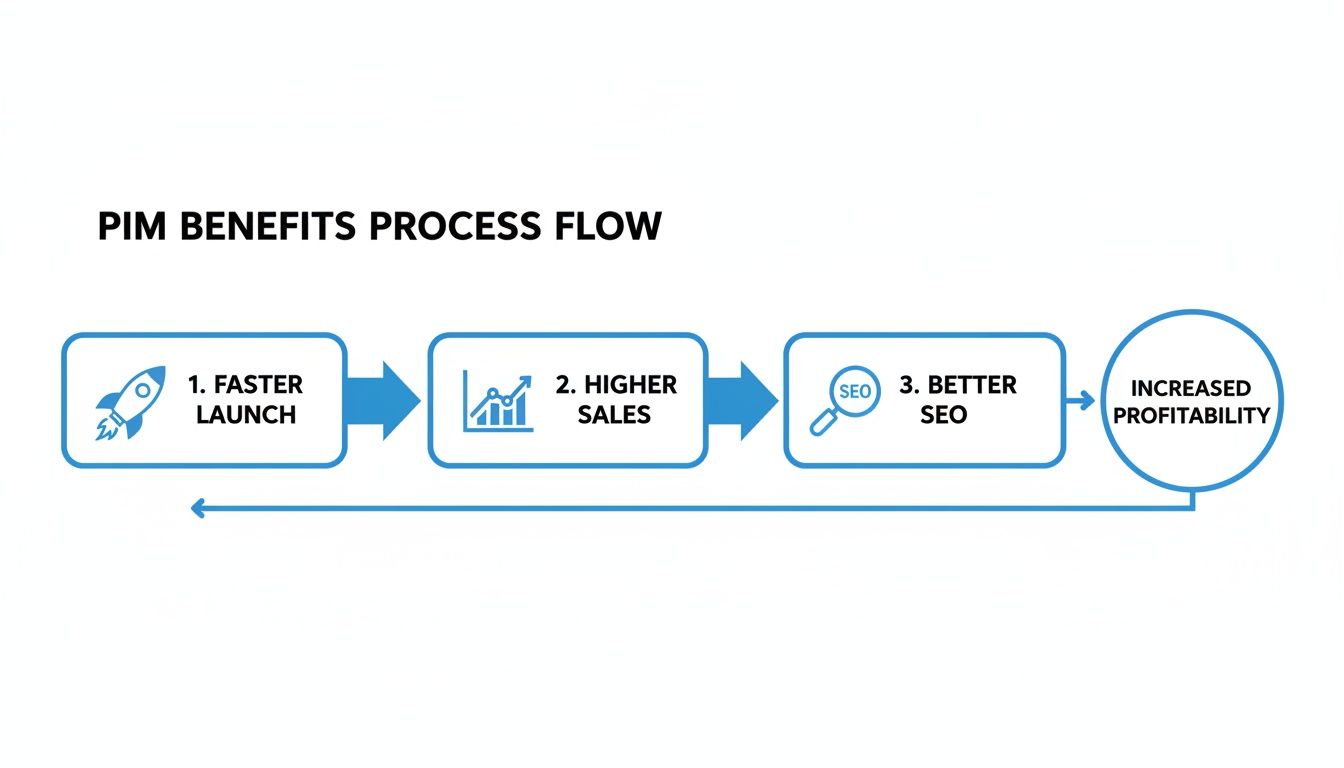
By getting your data straight, you make faster launches possible. That directly leads to higher sales and better SEO, kicking off a powerful cycle of growth.
Before you can move your data into its new home, you’ve got to figure out what you actually have. This first step is all about finding and cleaning up your existing product information. Don't skip this. It's the most important part—garbage in, garbage out.
You’ll need to track down all your product data, which is usually scattered across places like:
Once you’ve rounded it all up, the real work begins. You'll be standardizing formats, fixing typos, filling in the blanks, and getting rid of duplicate or outdated info. It’s like decluttering your house before a big move—you only want to bring the good stuff.
With your squeaky-clean data ready to go, it’s time to move it into the PIM. Modern platforms like NanoPIM make this part surprisingly simple, letting you map columns from your spreadsheets directly to fields in the new system.
This is also where you'll shape the PIM to fit your business like a glove. You'll set up your data model, decide who can see and edit what with user roles, and build out your workflows. For example, you could create a rule that says a new product description from a writer must get a thumbs-up from the product manager before it can go live.
Think of this phase as setting up the rules of the road for your data. By establishing strong data governance from day one, you ensure your information stays clean and trustworthy long after you've set everything up.
This kind of structure prevents the very data chaos you’re trying to escape from creeping back in.
A PIM doesn't live on an island. Its real magic happens when it talks to the rest of your tech. The next step is connecting your PIM with your other key systems, creating a seamless flow of information across your entire business.
Key connections usually include:
These connections get rid of endless, soul-crushing manual data entry. When you update information in the PIM, it automatically updates everywhere else. This is the automation that truly changes how you work, guaranteeing consistency across every single customer touchpoint.
Not all PIM platforms are the same, and picking the right one is a huge decision that will shape how your business grows. It’s tempting to just grab the one with the longest feature list, but that's a classic mistake.
What you're really looking for is a partner—a tool that fits how your team works, connects with the software you already use, and is ready to grow with you.
Getting past the sales pitch means focusing on what will actually make a difference every day. We’re talking about scalability, ease of use, integrations, and knowing someone has your back when you need help. This is your guide to asking the right questions to find a product information management solution that's in it for the long haul.
It’s easy to get wowed by a demo that shows off a hundred different features. But honestly, the best PIM is the one your team will actually use. A super-complex system can create more headaches than it solves, leading to people not using it and a wasted investment.
Make a clean, simple user interface a top priority. Can your team find what they need without a week of training? How many clicks does it take to do a common task, like tweaking a product description? A platform that just makes sense is one that will stick.
Your goal isn't just to buy software; it's to solve a business problem. A PIM should feel like an extension of your team, making their jobs easier, not adding another layer of complexity to deal with.
This focus on user experience is what makes sure you get the full value from your investment. When people enjoy using a tool, they'll actually use it.
Your PIM has to play well with others. It absolutely must connect smoothly with the other key systems you rely on every day, like your ERP, e-commerce platform, and marketing tools. Before you even think about signing a contract, get a crystal-clear picture of how a provider handles integrations.
Ask potential PIM companies about their pre-built connectors for platforms like Shopify or Magento, and find out how their API works for any custom connections you might need. A PIM with a flexible and well-documented API is a great sign that it’s built to adapt to your specific setup.
Scalability is just as important. Your business is going to grow, and your PIM needs to handle that growth without breaking a sweat. Think about this:
Choosing a PIM that can scale means you won’t have to go through this whole stressful selection process again in a couple of years.
PIM pricing can be all over the map, which makes a straight-up comparison feel impossible. Some charge per user, others by the number of products, and many have confusing tiered plans. You want a provider with a transparent pricing model that actually lines up with how your business works.
Modern, flexible pricing often ties costs directly to usage. NanoPIM, for example, uses a token-based system where you only pay for what you actually use—storage, AI actions, and data syncing. This is perfect for businesses with seasonal spikes, as your costs naturally go up and down with your activity. By exploring different solutions, you can find the right PIM platform for your needs without overpaying for features you'll never touch.
As you check out your options, dig deep into what’s really included. Are there hidden fees for support, API access, or getting started? A clear, predictable price tag helps you budget effectively and avoid any nasty surprises down the road.
Choosing the right PIM is a major step. This checklist is designed to help you and your team cut through the noise and focus on what truly matters for your business. Use these questions to guide your team discussions and vendor meetings.
| Evaluation Area | Key Questions to Ask Your Team | What to Look for in a Provider |
|---|---|---|
| User Experience (UX) | Is it easy to use? Can our non-tech team members figure it out quickly? | A clean, modern look. Good reviews about ease of use. A free trial to test it yourself. |
| Integration | What key systems (ERP, e-commerce, etc.) must it connect to? Does it have pre-built connectors? | A strong, well-documented API. A list of existing integrations. A clear process for custom connections. |
| Scalability | Can it handle our expected growth in products, users, and markets over the next 3-5 years? | Cloud-based technology. Success stories from businesses your size. No hard limits on data. |
| Core PIM Features | Does it support our specific data needs, like product variations and custom attributes? | Flexible data modeling. Strong digital asset management (DAM). Customizable workflow and approval tools. |
| Total Cost of Ownership | What's the pricing model? Are there hidden costs for support, training, or API calls? | Transparent, usage-based, or clearly tiered pricing. No surprises. All costs are laid out upfront. |
| Support & Onboarding | What level of support is included? Is there a dedicated process to help us get started successfully? | Dedicated customer success managers. Lots of help guides and training videos. Responsive support teams. |
By thoughtfully considering each of these areas, you can move beyond a simple feature list. You'll be ready to choose a PIM partner that not only meets your needs today but is also prepared to support your growth for years to come.
Still have a few things on your mind? Perfect. Let's clear up some of the most common questions people have when they're first diving into the world of product information management.
Think of it like this: your ERP (Enterprise Resource Planning) is the logistical brain of your business. It’s a master of numbers, keeping track of how many items you have in stock, where they are, and handling all the money stuff.
A PIM, on the other hand, is the marketing and sales brain. It takes the basic product data from the ERP—like the SKU and inventory count—and makes it shine. The PIM is where you manage all the rich, customer-facing content, like great descriptions, high-res photos, and videos.
In short, the ERP manages the stock count, while the PIM makes the product look so good people actually want to buy it. They work best as a team, with the PIM pulling core data from the ERP and polishing it for all your sales channels.
The honest answer? It depends. A smaller project with clean, well-organized data might only take a few weeks to get up and running. But a huge project with messy data and lots of integrations could take several months.
The biggest factors are the quality of your current data, the number of products you have, and how many other systems you need to connect to. The good news is that modern cloud-based PIMs are designed for a much faster setup than older systems. A project with clear goals always moves quicker.
Absolutely. In fact, it’s one of the most powerful—yet often overlooked—benefits. Search engines love structured, consistent, and detailed data. A PIM makes sure that every single product listing, no matter where it is, uses the right keywords, details, and high-quality photos.
This consistency is a huge signal to search engines that your content is trustworthy and high-quality. When Google sees the same accurate information everywhere, it rewards you with better rankings, making a PIM a great way to build a strong foundation for both regular SEO and the new wave of AI-driven search.
Ready to stop juggling spreadsheets and start building a single source of truth for your products? See how NanoPIM uses AI to centralize, enrich, and optimize your product information for every channel. Explore NanoPIM today.


