

Product catalog management software is the single source of truth for all your product information. It’s a central system that organizes everything from SKUs and descriptions to images and videos, making sure every team has access to the same accurate, up-to-date data.

Think about your product data like a massive library. Right now, the books are probably scattered everywhere. A few are in marketing’s corner, sales has a different stack, and some seriously outdated copies are collecting dust in the warehouse office.
Pages are missing. Notes are scribbled in the margins. Nobody can ever find the right edition when they actually need it.
That chaos is exactly what happens when businesses try to run on messy spreadsheets and disconnected folders. It creates confusion, triggers costly errors, and grinds your entire operation to a halt.
Now, imagine product catalog management software as the ultimate librarian for this messy library. It doesn’t just store the books; it carefully organizes them into a central, digital hub where every single piece of product information lives.
This system is your command center, making sure everyone works from the same playbook.
When the marketing team needs a high-res image for a new campaign, it’s right there. When a salesperson needs the latest tech specs for a client call, they pull it from the one trusted source.
In practice, this looks like:
This organized approach means you can finally stop chasing down files and correcting outdated information. Instead of managing chaos, your teams can focus on what they do best, creating great customer experiences and driving sales.
It's easy to look at this and think it’s just a fancy spreadsheet, but it’s so much more powerful. A simple spreadsheet buckles under the weight of complex product relationships, like all the size and color variations for a single t-shirt. It certainly can't manage thousands of high-quality images and videos.
Product catalog management software is actually a special kind of enterprise content management solution, built specifically to handle the unique demands of product data. It connects all the dots, linking text descriptions with digital assets, pricing with inventory levels, and marketing copy with technical specs.
This integration is the key. It breaks down the data silos that create so much friction inside a company. In fact, studies show that inconsistent product information leads to a major drop in customer trust and a spike in returns, hitting your bottom line directly.
By creating one central source of truth, you’re not just getting organized. You’re setting the stage for a more efficient, profitable, and scalable business.

To really get what product catalog management software does, you have to look under the hood. This isn't just a fancy digital filing cabinet. It’s a powerful engine built from specific parts that work together to organize, enrich, and ultimately distribute your product data.
Think of it like a central command center for everything a customer sees and reads about your products. Each feature is designed to solve a very real and often very expensive business headache. Let's break down the essential tools in this command center.
At the very core of any good catalog system is Product Information Management (PIM). This is the single source of truth for your entire operation. It's the one place where every last piece of product data lives, from SKUs and technical specs to marketing copy and pricing.
Before PIM, this critical information was probably scattered across dozens of spreadsheets, buried in email chains, and saved on local drives. It was a mess, and that chaos inevitably leads to costly mistakes and inconsistencies.
A PIM system puts an end to that. When a product spec changes, you update it once right there in the PIM and that change populates everywhere else. Total consistency, guaranteed.
If the PIM is the brain, then Digital Asset Management (DAM) is the super organized media library. This is where all your visual and media files, your "digital assets," are stored, tagged, and managed. We're not talking about a simple shared folder. This is a sophisticated system built for commerce.
A DAM typically handles:
Crucially, the DAM links these assets directly to the right product in the PIM. So when you look up a specific SKU, you don’t just get its description. You get every approved photo, video, and PDF, all perfectly organized and ready for any channel.
Raw data like dimensions, materials, and features doesn't sell products. Stories do. Content enrichment is the process of turning that dry, factual data into compelling content that connects with customers.
This is where modern catalog software really shines, often using AI to do the heavy lifting. You can feed it a list of bullet points for a new blender and have it generate a persuasive description that highlights how it makes life easier for a busy parent.
This is also where you can fine-tune content for different channels, whether it's optimizing for SEO keywords or meeting the strict formatting rules for marketplaces like Amazon. A key part of this is robust Target Catalog Optimization, making sure your products always look their best, no matter where they're sold.
How do you handle a single t-shirt that comes in 10 sizes and 15 different colors? That’s 150 unique combinations. This is where attribute and variant modeling comes in, and it’s a lifesaver.
Instead of creating 150 separate product pages from scratch, you create one "parent" product. Then you define its attributes like "size" and "color" and the system helps you manage every possible combination, linking the correct SKU, price, and image to each specific variant. It turns a logistical nightmare into a simple, manageable task.
Finally, great software can't exist in a bubble. It has to connect to your people and your other tools. That’s what workflows and integrations are for.
Workflows automate your internal processes. For example, a workflow can be set up so that when a new product is added to the PIM, it automatically creates a task for a copywriter to create a description. Once they're done, it pings a manager for approval before anything goes live.
Integrations are the digital handshakes that connect your catalog software to other essential systems, like your eCommerce platform (Shopify, BigCommerce), your ERP, or your marketing tools. This creates a seamless flow of data, cuts out mind-numbing manual entry, and makes sure all your systems are perfectly in sync. If you're curious about this, check out how we at NanoPIM tackle these complex data challenges.

Alright, let's talk about picking the right product catalog management software. It can feel like a huge task. With countless options flashing feature lists and technical jargon, it’s easy to get analysis paralysis. The trick is to tune out the noise and focus on what your business actually needs, not just for this quarter, but for the next five years.
This decision is more than just buying a tool. You're choosing a partner in your growth. Get it right, and you’ll see a huge boost in efficiency and sales. Get it wrong, and you've just created a whole new set of expensive problems. To help you nail it, let's break down the criteria that truly matter.
Scalability isn't a "nice-to-have." It's everything. The software that works perfectly for your first 1,000 products needs to be just as smooth when you hit 100,000. Think bigger. Are you planning to launch new product lines? Expand into different countries?
Your platform has to keep up without lagging, crashing, or becoming a clunky mess. Ask vendors straight up: how does your system perform under pressure, and what does it take to scale? A platform that can't keep pace with your ambition is a liability waiting to happen.
The most feature-packed, powerful software on earth is completely useless if your team dreads logging in. A clean, intuitive user interface is non-negotiable. Your product managers, marketers, and data specialists should be able to get in, get their work done, and get out, all without needing a PhD in computer science.
Look for a simple layout and logical navigation. If the demo feels clunky and confusing, just imagine the chaos during a high-stakes product launch.
The goal is to empower your team, not chain them to another technical headache. A platform designed with the user in mind will see far better adoption and a much quicker return on investment.
A user-friendly system means less time training and more time actually improving your product data. That directly translates to getting products in front of customers faster. For more on how the right tools can reshape your operations, check out our other guides on building a modern e-commerce tech stack.
Your product catalog management software doesn't live on an island. It has to play nice with all the other systems that keep your business running. This is where integrations move from a feature list to a critical requirement.
Make sure the platform connects seamlessly with your core stack:
Without solid, pre-built integrations, you're signing up for a world of manual data entry and CSV uploads. That’s the exact soul-crushing work you’re trying to eliminate in the first place.
To make this process a bit more tangible, here's a quick-reference table. Use it as a checklist when you're sitting in on demos or comparing different vendors. It helps cut through the sales pitch and focus on the capabilities that will actually move the needle for your business.
| Feature Category | What to Look For | Why It Matters |
|---|---|---|
| Data Modeling | Flexible attributes, variant handling, support for complex hierarchies. | Your products aren't simple. Your software needs to handle all the sizes, colors, and unique specs without workarounds. |
| Usability (UI/UX) | Clean dashboard, intuitive navigation, bulk editing capabilities. | If it's hard to use, your team won't use it. Widespread adoption is key to getting any real value from the platform. |
| Integrations | Pre-built connectors for your ERP, eCommerce, and marketing stack. | Avoids manual data entry, reduces errors, and creates a single source of truth across your entire business. |
| Automation & AI | AI-driven description generation, image tagging, data validation rules. | Frees up your team from tedious manual work so they can focus on high-impact strategic tasks. |
| Scalability | Performance benchmarks for large catalogs, clear upgrade paths. | Ensures the system can grow with your business instead of becoming a bottleneck that holds you back. |
| DAM Capabilities | Centralized asset storage, metadata tagging, image transformations. | Keeps all your product images, videos, and documents organized and easily accessible for any channel. |
This isn't an exhaustive list, but it covers the big-ticket items. A platform that checks these boxes is well on its way to being a solid long-term partner.
AI and automation aren't just trendy buzzwords anymore. They're fundamental features that create a real competitive advantage. A modern platform should be using smart technology to take tedious, repetitive tasks off your team's plate.
For example, can it draft a compelling product description from a list of boring technical specs? Can it automatically tag images with relevant keywords? Can it suggest SEO improvements to help you rank higher on marketplaces? These aren't frills. They are force multipliers that let your team focus on strategy instead of being buried in spreadsheets.
Last but not least, you have to find a pricing model that aligns with your budget and business reality. Software pricing comes in a few different flavors, so it's important to dig in and understand exactly what you're paying for.
Some vendors offer a flat monthly subscription, which gives you predictable costs. Others use a usage-based model, where you pay for things like data storage or the number of products you manage. This can be great for businesses with seasonal peaks, as your costs scale up and down with activity. Look beyond the sticker price and calculate the total cost of ownership, factoring in implementation fees and the massive savings you'll gain from a more efficient team.
Bringing new product catalog management software into your workflow doesn’t have to be a nightmare. A successful launch isn't about flipping a switch overnight. It's about following a clear, strategic roadmap. This isn't some dense technical manual. It's a guide to help you plan the project and get your team on board with as little friction as possible.
By breaking the process down into manageable phases, you can sidestep the common pitfalls that trip so many companies up. Let's walk through the key steps, from the first planning meeting all the way to go-live day.
Before you even think about touching a single piece of data, you need a rock-solid plan. The first step is to get brutally honest about what success actually looks like for your team. What specific pain points are you trying to fix? Are you trying to slash time-to-market for new products by 30%, or just kill the constant data entry errors that drive everyone crazy?
Set clear, measurable goals. These will become your north star, guiding every decision you make throughout the project.
Next, it's time to conduct a thorough audit of your existing product data. Figure out where it all lives in random spreadsheets, ancient databases, forgotten shared drives and assess its quality. Be real about how messy it is. This audit gives you a clear picture of the cleanup job ahead and helps you set timelines that aren't pure fantasy.
Now for the most critical and most underestimated phase: data migration. Think of it like moving into a new house. You wouldn't just dump all your old, cluttered boxes into a shiny new home, right? You'd sort through them, toss the junk, and organize everything first. The exact same principle applies here.
Before you migrate anything, you have to clean up your data. This means getting your hands dirty with tasks like:
A clean data set is the foundation of a successful PIM implementation. Rushing this step will only import your old problems into your new system, completely undermining the entire project. Take the time to get it right.
Once your clean data is loaded into the new system, it's time to mold the software to fit your actual business processes. This is not a one-size-fits-all situation. You need to configure it to match how your team really works, not how the software vendor thinks they should.
Start by setting up user roles and permissions. Who gets to edit critical product information, and who only needs view-only access? Defining these roles from the get-go protects your data integrity and keeps things secure.
Next, map out your team's workflows. You could, for instance, create an automated approval process where new product descriptions are automatically routed to the marketing manager for a final look before they go live. This kind of setup streamlines collaboration and gets rid of those frustrating bottlenecks. For a deeper dive into optimizing content creation, it's worth understanding the principles of Generative Engine Optimization and how it's changing modern e-commerce.
The final stretch is all about your people. A powerful tool is totally useless if your team doesn't know how to use it. Put together a comprehensive training plan that speaks to the specific needs of different roles, from the data entry specialists to the marketing team.
And please, don't try to launch everything at once. A phased rollout is almost always the safer bet. You could start with a single product category or one specific sales channel. This lets you identify and squash any bugs on a smaller scale before a full, company-wide launch. This careful, step-by-step process ensures your new product catalog management software becomes a game-changing asset, not just another source of frustration.
So, you’ve invested in new product catalog management software. That’s a huge step. But how do you actually prove it was the right one? The real win isn’t just about having a cleaner dashboard. It’s about seeing tangible results that hit your bottom line. You have to move past fuzzy ideas and start tracking clear, measurable metrics that show a real return on your investment (ROI).
This is all about connecting the dots. You need to draw a straight line from having a centralized product data hub to the day-to-day victories your business is seeing. The goal is to build a rock-solid business case you can confidently show to stakeholders, backed by hard numbers that prove the software’s worth.
One of the first places you’ll notice a difference is in your team’s productivity. Just think about all the time currently wasted hunting down the right product image or manually updating specs across ten different spreadsheets. This is the low-hanging fruit when it comes to calculating ROI.
Start by benchmarking a few key operational metrics before and after you make the switch:
These efficiency boosts free up your team to do the work that actually matters, like market research and campaign planning, instead of drowning in repetitive admin tasks.
Better data isn’t an internal vanity metric. It directly translates to a better customer experience. Inaccurate or inconsistent product information is one of the fastest ways to frustrate a customer, leading to abandoned carts and, you guessed it, costly returns. When you improve data quality, you directly improve customer satisfaction.
The metrics to watch here are pretty straightforward: a drop in customer service tickets related to product questions and a lower product return rate. For instance, if returns due to "item not as described" fall by 25%, that’s a direct financial win you can pin right on your new software.
Improving data accuracy isn't just about internal housekeeping. It's a powerful way to build customer trust and loyalty, which has a lasting impact on your brand's reputation and repeat business.
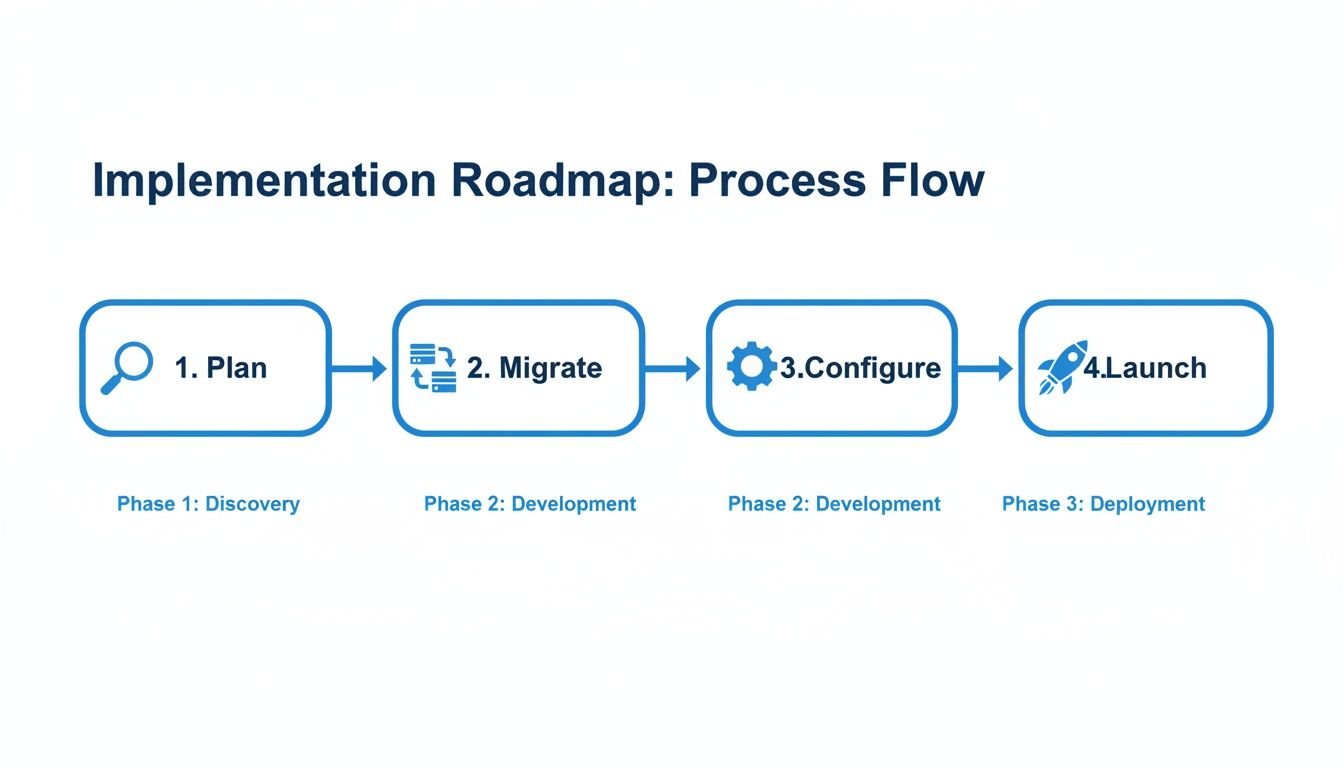
This roadmap highlights that a successful rollout hinges on a structured approach. You can't just jump to the end. Careful planning and data migration are the critical foundation you build everything else on.
Ultimately, the most powerful ROI calculation is the one that connects your catalog software directly to revenue. High-quality, enriched, and consistent product content is what drives higher conversion rates. It’s simple: when product pages have better descriptions, more images, and accurate specs, customers feel more confident hitting that "buy" button.
Track your sales and conversion metrics on a per-product or per-category basis to see the uplift. The market data backs this up, too. Product catalogs now hold a massive 64.3% revenue share in the catalog management space as businesses grapple with increasingly complex data. The whole market is projected to grow at 11.1% annually through 2030, pushed by e-commerce expansion and the need for personalized experiences, all powered by robust, centralized data. You can read the full research about the catalog management system market to see just how critical this has become.
Jumping into the world of product catalog software can feel like a big leap. Even after you've got the basics down, a few practical questions always seem to pop up. That's totally normal. It's one thing to understand a concept, and another to picture how it fits into your daily workflow.
We get it. To help clear things up, we’ve put together a list of the most common questions we hear from teams just like yours. Think of this as a quick-fire round to give you the confidence you need for the next step.
For a brand-new business, a spreadsheet can feel like the right move. It’s familiar, it’s cheap (or free), and it seems simple enough to get started. But trust me on this, that simplicity is a trap. As soon as your product count grows or you expand to new channels, that trusty spreadsheet becomes your biggest bottleneck.
There’s zero version control, which is a recipe for pure chaos. It's way too easy for someone on your team to grab an old file, leading to incorrect prices, descriptions, or specs going live on your site. Nightmare fuel.
Plus, spreadsheets are just awful at handling rich media like images and videos. They can’t enforce data rules to keep everything consistent, and they definitely can’t automate the workflows you need to launch products fast.
A spreadsheet is like a paper road map. A product catalog management platform is a live GPS. Both can show you the way, but only one gives you real-time accuracy, navigates complex routes effortlessly, and keeps you from getting hopelessly lost.
Moving to dedicated software solves all of this by creating a single, secure, and scalable source of truth for everything related to your products.
That's the million-dollar question, isn't it? The honest answer is: it varies. A lot. The price tag really depends on a few key things, like how many products you’re managing, how many people need access, and which specific features you need.
You'll generally run into a couple of pricing models out there:
When you're looking at options, try to see past the sticker price. Think about the total cost of ownership. That includes any setup fees, but more importantly, it includes the money you'll save from running a more efficient, error-free operation.
These three get thrown around so much they often sound like the same thing. It can be super confusing, but it’s actually pretty simple if you think of them in layers.
Imagine you're building a house. Product Catalog Management is the entire project, the whole process of building the house, decorating it, and showing it off to the world. It’s the full-stack operation of organizing and distributing your product information.
Inside that house, you have two critical systems:
A real, comprehensive product catalog management software brings both PIM and DAM under one roof. It connects the blueprint with the media library, creating a single, unified platform where every bit of data and every single file are perfectly linked.
The timeline for getting a new catalog system up and running can be anything from a few weeks to several months. The single biggest factor? The quality and complexity of your current product data.
It’s simple: the cleaner your data is to start with, the faster everything goes. If your information is already well-organized and consistent, you’re way ahead of the game.
Other things that play a role include:
A well-planned project with clear goals and a dedicated team can seriously shorten that timeline. Many modern cloud-based solutions are built for a much quicker setup than old-school, on-premise systems. The key is to do your prep work and have a clear roadmap before you even start.
Ready to stop managing product data chaos and start driving growth? NanoPIM gives you the AI-powered tools to centralize, enrich, and optimize your entire product catalog from one powerful hub. Discover how NanoPIM can transform your business.


