

Your week probably has a familiar rhythm.
A supplier sends a spreadsheet with new specs. Your ERP has the “official” inventory count. Marketing keeps product images in a shared drive. Amazon needs one format, your Shopify store needs another, and someone on the team is manually pasting values between systems while hoping nothing breaks.
That setup works right up until it doesn’t.
A size field gets overwritten. An old image goes live on a marketplace. Inventory updates late, so a customer buys something that is already gone. Then the team spends the afternoon figuring out which system is “right.”
A data integration platform is what turns that mess into a controlled flow. It is not glamorous software. It usually sits in the background. But in AI-heavy, multichannel commerce, it does the quiet work that keeps product data, inventory, and customer information moving in the right direction.
Leah runs ecommerce operations for a growing retail brand. None of her tools are broken on their own.
Her ERP stores pricing and stock. Her PIM holds product attributes. Her DAM has images and videos. Her marketplace team updates Amazon listings in one tool, while the web team tweaks product copy in another. Every system makes sense by itself.
Together, they create friction.
On Monday morning, Leah sees a product go out of stock in the warehouse. By lunchtime, that same product is still listed as available on a marketplace because the update has not reached every channel. On Tuesday, a supplier sends revised dimensions in a spreadsheet, but those values never make it into the storefront. On Wednesday, a customer support agent answers a question using old information from the CRM.
Nobody made a huge mistake. The systems just were not connected well enough.

This is the hidden cost of data chaos. Teams lose time. Customers see inconsistencies. Leaders hesitate because reports do not line up.
The reason this matters so much now is simple. Modern businesses are running more tools, more channels, and more AI-powered workflows than before. The market reflects that shift. The global data integration market reached $15.24 billion in 2026 and is projected to grow to $47.60 billion by 2034, while organizations using modern integration services can see 295% ROI over 3 years with a 6-month payback period, according to Integrate.io’s data integration adoption analysis.
Growth multiplies the problem.
One storefront becomes several. A simple product catalog becomes a tangle of variants, bundles, channel rules, and regional content. Then AI enters the stack and needs clean inputs to generate useful outputs.
Key takeaway: Bad integration does not stay an IT problem. It shows up as listing errors, manual work, reporting confusion, and slower decisions.
Teams rarely say, “We need a data integration strategy.”
They say things like:
Those are integration questions, even if nobody uses the term.
A data integration platform is software that helps your business systems exchange data in a controlled, repeatable way.
That sounds technical, so here is the simpler version.
Imagine it as a central shipping hub for information.
Your ERP, CRM, PIM, DAM, ecommerce platform, marketplace tools, analytics stack, and help desk all send out packages. Those packages contain product specs, prices, stock counts, customer records, images, and order updates. Each system labels things differently. Some send boxes, some send envelopes, some send loose papers.
A data integration platform receives those packages, sorts them, checks them, repackages them if needed, and sends them to the right destinations in the format each destination expects.
People often hear “integration” and think it means copying data from one app to another.
That is only part of the job.
A good platform also helps you:
Without that middle layer, teams often build one-off connections. Those can work for a while. Then the business adds another sales channel, another supplier feed, another AI tool, and suddenly every connection becomes harder to maintain.
Say your ERP stores color as “BLK,” your storefront wants “Black,” and a marketplace requires “black” in lowercase.
A person can fix that manually. But doing it across thousands of products, every update, every day, gets old fast.
A data integration platform handles the translation automatically. It knows:
The confusion is fair because a data integration platform often touches the same territory as other systems.
Here is a simple distinction:
| Tool | Main job |
|---|---|
| ERP | Runs operational records like inventory, purchasing, and finance |
| CRM | Manages customer relationships and sales activity |
| PIM | Organizes product information for selling channels |
| DAM | Stores and manages images, videos, and media assets |
| Data integration platform | Connects these systems and manages how data moves between them |
The integration layer is the traffic controller. It is not replacing every other system. It is making the whole stack work together.
AI tools are hungry for data, but they are picky eaters.
If your source data is incomplete, inconsistent, or trapped in separate systems, your AI workflow will struggle. Product description generation, search optimization, recommendations, and reporting all depend on trusted inputs.
That is why integration has become one of those “boring but decisive” capabilities. It is the plumbing behind cleaner automation and better AI use.
Tip: If a new AI project sounds promising but your team keeps saying “our data is scattered,” the problem is often integration before it is AI.
The easiest way to understand a data integration platform is to look at the parts that do the heavy lifting.
Each feature solves a very practical problem.
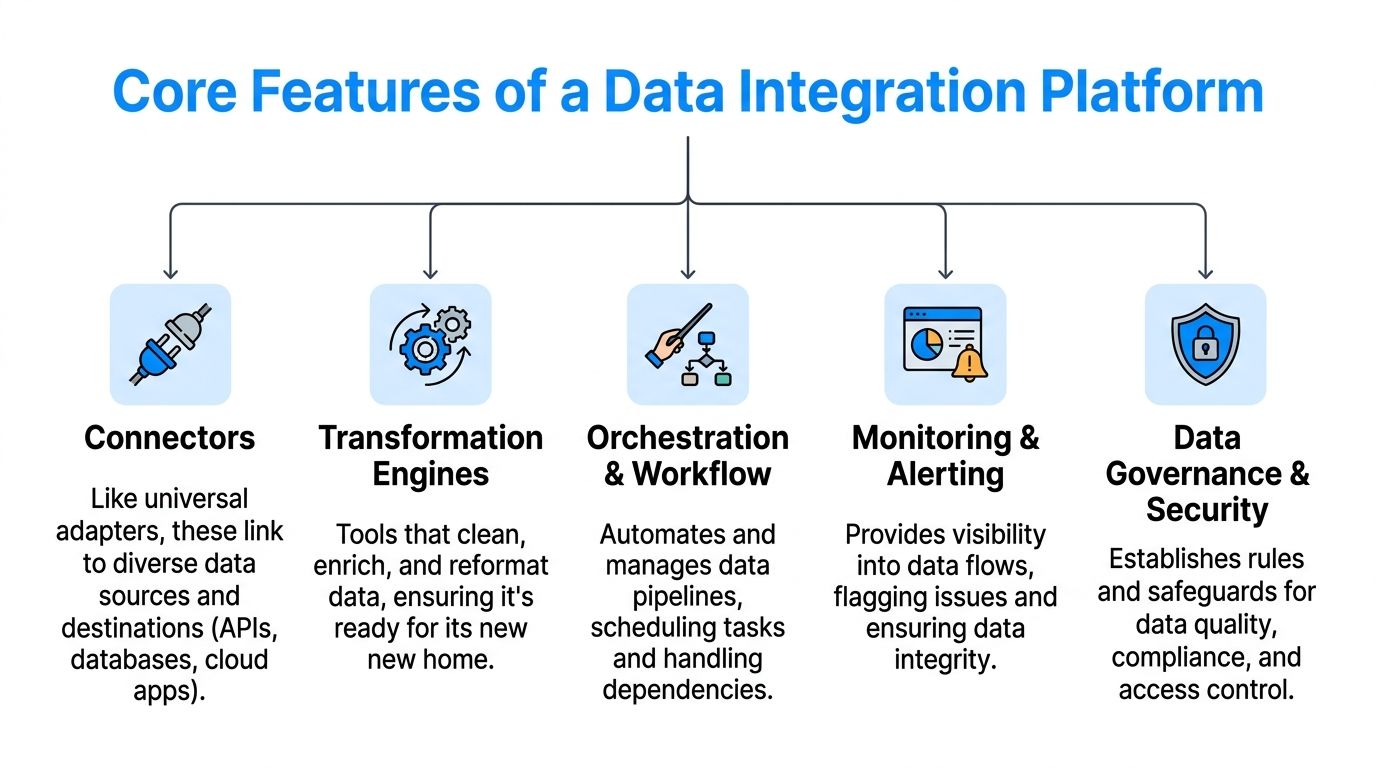
Connectors are the adapters.
They let the platform talk to outside systems such as Shopify, NetSuite, Salesforce, Amazon, Google Sheets, databases, file storage, or custom APIs. Without connectors, every new system would require a custom build from scratch.
For non-technical teams, this is often the first thing that matters. If your platform cannot connect cleanly to the tools you already use, everything else is academic.
A strong connector library usually means faster setup and fewer brittle workarounds.
In this stage, raw data becomes usable.
A supplier file may call a field “item_no.” Your ERP might use “sku.” Your storefront may expect “product_id.” Mapping tells the platform these fields represent the same thing.
Transformation handles the cleanup and reshaping. It can standardize date formats, split one field into several, combine values, clean category labels, or apply naming rules.
If you are new to the concept, this explanation of data ingestion meaning is a useful companion because ingestion is usually the first step before transformation starts.
You will hear terms like ETL and ELT in integration conversations.
You do not need to be technical to get the basic idea.
For most business users, the choice matters less than the outcome. The main question is whether your team can reliably get data from source to destination in a form people can trust.
This is the conductor.
A platform does not just move one record one time. It manages sequences. It decides what should happen first, what depends on what, and what to do if one step fails.
For example:
That sequence is orchestration. It turns disconnected tasks into a repeatable workflow.
Not every update needs to happen instantly.
Some data should refresh right away, like inventory changes that affect availability. Other data can update on a schedule, like nightly attribute refreshes or weekly reporting feeds.
A good platform supports both. It helps teams avoid two bad extremes: stale data everywhere or expensive complexity where real-time speed adds little value.
This is one of the most underrated features.
Integrations fail. APIs change. Fields go missing. Supplier files arrive in a slightly different format. If you do not know something broke, bad data can spread.
Monitoring shows the health of your pipelines. Alerts tell the right people when something needs attention.
That matters a lot in commerce because one silent error can ripple through inventory, listings, ads, and reporting.
This is the quality-control layer.
It sets rules about what data is allowed, who can change it, and how sensitive information is handled. In ecommerce and retail, this can cover customer details, pricing logic, supplier data, and content standards.
According to AIMultiple’s review of ecommerce data integration software, advanced governance features like automatic PII detection and schema enforcement can reduce integration errors and reporting discrepancies by up to 30-50% in complex retail setups, while proactive notifications can alert teams to data quality issues before data is synced to platforms like Amazon or eBay.
That sounds abstract until you translate it into daily work. Schema enforcement means a field expected to hold a valid price does not suddenly receive text. PII detection means sensitive customer data is identified and handled more safely. Alerts mean your team hears about a problem before shoppers do.
Practical rule: If a platform makes it easy to connect systems but hard to enforce rules, it may create faster chaos instead of cleaner operations.
No single feature saves the day alone.
Connectors bring systems into the conversation. Transformation makes them understand each other. Orchestration manages the sequence. Monitoring catches issues. Governance keeps the data reliable and safe.
That combination is what turns integration from a one-off project into a durable business capability.
Not all integrations are organized the same way.
Two companies may use similar tools but end up with very different levels of complexity depending on how those tools are connected.
Point-to-point means each system connects directly to another system.
Your ERP sends stock to Shopify. Shopify sends orders to the ERP. The DAM sends images to the PIM. The PIM sends attributes to marketplaces. Then marketing adds another tool, and that tool needs its own direct links too.
This feels quick at first. It often starts with a reasonable thought: “We only need these two systems to talk.”
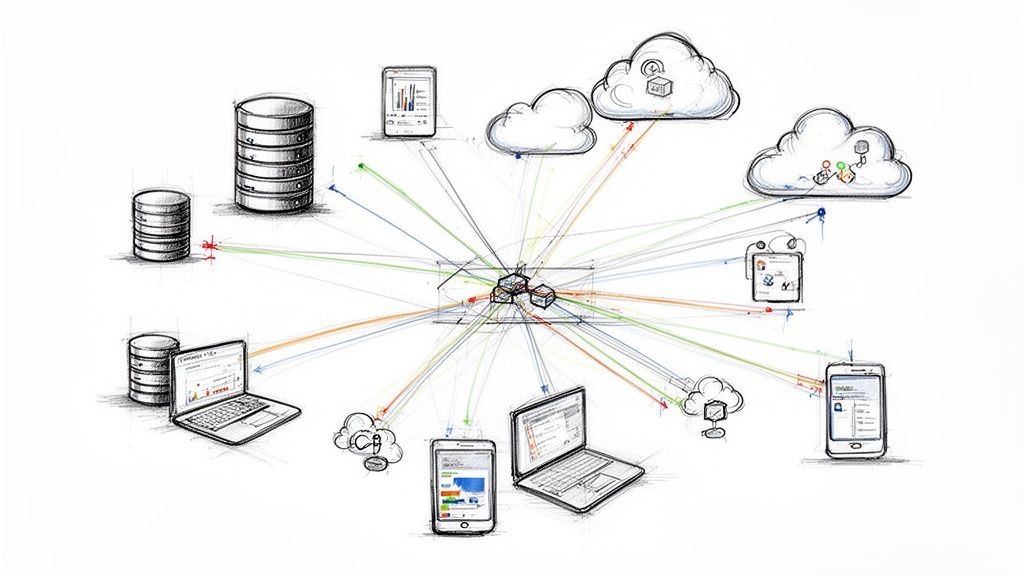
The problem appears later. Every new system adds more direct connections. The setup starts to look like tangled cables behind a desk.
Hub-and-spoke puts a central platform in the middle.
Instead of every app connecting to every other app, systems connect to the hub. The hub manages the movement, transformation, rules, and routing.
That brings a few big benefits:
For teams comparing approaches, this overview of integration platform as a service gives useful context on why centralized cloud integration models are popular.
| Pattern | What it feels like | Best fit | Main drawback |
|---|---|---|---|
| Point-to-point | Fast to start | Small, simple environments | Becomes messy as systems grow |
| Hub-and-spoke | More deliberate upfront | Growing businesses with multiple apps | Requires planning and governance |
| API-led connectivity | Structured and reusable | Teams building for scale and flexibility | Can demand more design discipline |
API-led connectivity is less about a diagram and more about a mindset.
Instead of building one-off links for each use case, teams expose data and functions through reusable APIs. That makes it easier to serve multiple downstream tools without rewriting the same logic repeatedly.
For example, instead of creating a separate custom feed for every channel, you might create a clean product API that several channels pull from.
For a growing retailer, the answer is usually not “the simplest thing possible.”
It is “the simplest thing that will still make sense a year from now.”
If you have a couple of systems and a stable catalog, point-to-point can be enough for a while. But if you are adding marketplaces, automation, richer product content, and AI workflows, a central integration model tends to hold up much better.
Key takeaway: The architecture decision shapes how painful future change will be. A messy pattern hides the cost until the business expands.
This gets easier to grasp when you see it in daily retail work.
A data integration platform is not just connecting software for the sake of neatness. It changes how teams handle stock, listings, media, customer data, and channel operations.
A common retail headache starts with one simple fact. Inventory lives in more than one place.
The warehouse or ERP may hold the operational truth. The storefront shows what shoppers can buy. Marketplaces need their own updates. If those systems drift apart, you get overselling, underselling, or support tickets nobody enjoys.
With a data integration platform, the ERP can act as the primary source for stock changes. The platform picks up the update, applies channel rules, and pushes the right availability status to each destination.
That means less manual reconciliation and fewer “why is this still live?” moments.
Product data rarely starts in a clean, ready-to-publish format.
A supplier may send a spreadsheet with rough specs. Merchandising may enrich the title and bullet points. Creative may upload fresh images. Marketplace teams may need channel-specific tweaks. If all of that happens in disconnected silos, listings drift.
Integration gives the process shape.
Raw specs can come in from one source, media from another, and downstream systems can receive only the approved fields they need. Instead of copying and pasting product details into every destination, teams manage the flow with rules.
Retail teams also struggle with partial customer views.
The CRM knows one thing. The email platform knows another. Ecommerce orders live somewhere else. Support history sits in a ticketing tool. It becomes hard to answer basic questions like “what has this customer bought?” or “which segment should this shopper be in?”
A data integration platform helps merge those signals into a more coherent picture. That supports better service, more relevant campaigns, and less guesswork when different teams interact with the same customer.
Integrations are not only an operations topic. They affect retention and product experience.
According to PartnerFleet’s integration statistics roundup, 84% of businesses see integrations as very important or a key requirement for customers, and 98% report that customers using integrations are less likely to churn. The same source says integration users churn 58% less on average.
For retail, the lesson is straightforward. Connected experiences tend to be stickier than fragmented ones.
Take a brand selling on its own site, Amazon, and eBay.
The operations team updates a product’s dimensions in the ERP after a supplier correction. The creative team uploads a new image set. Merchandising revises the title to fit current search terms. Without integration, each team may touch different systems and trust that someone else will finish the job.
With a data integration platform:
The team spends less time chasing consistency and more time improving the offer.
Retailers are adding AI for content generation, search optimization, categorization, and internal productivity. But AI does not magically fix fragmented source data.
If product attributes are inconsistent or media links are unreliable, AI outputs become less dependable. You may generate copy from stale specs or optimize listings with missing details.
Integration gives AI a steadier foundation. It makes sure the raw material is more complete, structured, and timely before automation touches it.
Tip: If your team wants better AI-driven product content, start by cleaning up how specs, assets, and channel data move through the business.
The sticking points are often ordinary:
A strong integration layer does not remove every operational decision. It does make those decisions visible and enforceable.
Most businesses do not need the “best” data integration platform in the abstract.
They need the one that fits their systems, their team, and the kind of complexity they have.
Vendors will show polished demos. That is normal.
Your job is to anchor the evaluation in real workflows. Ask which processes create the most friction today. Inventory sync. Supplier onboarding. Product enrichment. Marketplace updates. Customer data merging. Those use cases should drive the shortlist.
If you start with a giant comparison sheet full of generic features, you can end up choosing a platform that looks impressive but solves the wrong problem.
A practical evaluation sounds like this:
Which connectors matter most to us right now?
If your business depends on NetSuite, Shopify, Amazon, a shared file source, and a PIM, verify those paths in detail.
How are mappings and transformations managed?
You want to know whether changes are easy to maintain when taxonomies, attributes, or channel rules evolve.
What happens when something fails?
Dashboards are nice. Alerting, logs, and recovery options matter more in day-to-day operations.
Who on our team can work with this?
Some platforms are friendly to business users. Others expect technical support for almost everything.
Can it grow without becoming fragile?
The right platform should handle more channels, more data sources, and more rules without turning into a maintenance project.
This is especially important once AI-driven workflows enter the mix.
The National Health IT Collaborative’s use of integrated data for health equity highlights the importance of de-identified data and secure endpoints, as covered by Healthcare IT News in its report on the Amazon-powered Data Fusion Center. Retail teams should ask similar questions about how product and customer data is handled, whether the platform supports audit trails, and whether human review is possible when automation or AI is involved.
For a deeper look at the policies behind that, this guide to a data governance strategy is a useful reference.
Practical rule: If a vendor cannot explain how data is protected, reviewed, and traced, keep asking.
A true test is not a happy-path demo.
It is what happens when a supplier changes a file format, a marketplace updates a field requirement, or your team launches a new channel before peak season. Good platforms make change manageable. Weak ones force developers into constant patch work.
This walkthrough gives a useful visual overview of what to look for in integration tooling:
The cheapest platform can become expensive if it needs custom work for every new use case.
The most feature-rich option can also be costly if your team only uses a fraction of what it offers. Total cost is usually a combination of software, implementation effort, maintenance time, training, and failure risk.
A simple checklist helps:
| Question | Why it matters |
|---|---|
| Does it support our core systems well? | Poor connector support creates workarounds |
| Can non-developers manage parts of it? | Reduces bottlenecks |
| Are monitoring and alerts strong enough? | Prevents silent failures |
| Does governance match our risk level? | Protects sensitive and business-critical data |
| Will this still fit in two years? | Avoids a short-term fix that must be replaced |
Choosing a platform is less about buying software and more about choosing how disciplined your data flow will become.
A general-purpose data integration platform connects the wider business stack.
A product-focused system solves a different problem. It gives all that connected product data a proper home where teams can review, refine, approve, and publish it with confidence.
That is where NanoPIM fits.
NanoPIM is not trying to be every kind of integration layer for every department. It is a specialized hub for product information and digital assets. That matters because product data has its own kind of chaos. Supplier sheets arrive half-complete. ERP exports are operational, not channel-ready. Images live in separate folders. Marketplace teams need different outputs for different destinations.
Even with strong integrations, product teams still need a place to:
That last step is easy to underestimate. Moving data is not the same as making it usable for commerce.
One of the most practical ideas in NanoPIM is the Data Holding Bay.
Instead of forcing every incoming update directly into live product records, it gives teams a staging area to import, compare, and merge changes more carefully. That is useful when updates come from ERPs, supplier files, agencies, or marketplace feeds that may not be perfectly aligned.
It is the difference between dumping boxes into the store and receiving them in the back room where someone can inspect the contents first.
AI can help turn raw specs into richer, channel-specific content. But AI works best when the underlying product data is centralized, structured, and governed.
NanoPIM helps create that foundation. It gives teams a product-focused destination for the outputs of integration work, and then supports enrichment, consistency, and controlled publishing across channels.
For retailers and brands, that is where the abstract idea of integration becomes tangible. Data arrives from many places, gets cleaned and reviewed in one place, and leaves in a format each channel can use.
If your team is trying to tame catalog chaos, centralize product content, and build cleaner workflows for AI-ready commerce, NanoPIM is worth a look. It gives product teams a practical way to turn disconnected specs, attributes, and media into organized, reviewable, channel-ready data without losing control.


