

An integration platform as a service (iPaaS) is like the ultimate universal translator, but for your business software. It’s a central hub that lets all your different systems, from your eCommerce store and inventory management to your marketing platforms, talk to each other seamlessly. Best of all, it allows them to share data automatically, without you needing to write a single line of code.
Ever tried to manage a team where every person speaks a different language? You’d spend all your time just relaying messages, and you know important details would get lost in translation. That’s exactly what it feels like to run a business with a bunch of disconnected software.
An integration platform as a service fixes this by creating a common language for all your applications. Instead of building dozens of fragile, custom-coded connections that break every time a single app gets an update, an iPaaS provides a managed, cloud-based solution. It’s the modern way to connect a complex digital ecosystem.
If you’re in eCommerce or retail, you know the daily struggle with data silos. Customer information is in your CRM, product data is locked in your PIM, and order details are stuck somewhere else entirely. This disjointed mess leads directly to hours of manual data entry, costly errors, and painfully slow decision-making.
An iPaaS is designed to tear down these walls. It automates the flow of information so that when a customer places an order on your website, your ERP updates the inventory levels and your logistics partner gets the shipping details, all in an instant. This simple automation frees up your team from the soul-crushing task of copy-pasting so they can focus on what actually matters: growing the business.
An integration platform as a service isn't just about connecting apps; it's about automating entire business processes and unlocking the real value hidden in your data. It turns scattered information into a powerful strategic asset.
This shift is more than just a convenience; it's a necessity for any team managing multichannel sales and complex product catalogs. The market growth proves it. The global iPaaS market was valued at USD 17.64 billion in 2025 and is projected to explode to USD 292.9 billion by 2035, growing at a blistering annual rate of 32.44%.
While older approaches relied on complex manual coding or hiring expensive system integrators, iPaaS offers a far more flexible, platform-based solution. This move away from rigid, hard-coded links to a dynamic central hub is what makes an iPaaS a true game-changer.
To make it crystal clear, let's look at the real-world headaches an iPaaS is built to solve. This table shows the "before" and "after" for businesses struggling with disconnected systems.
| Business Challenge | Without iPaaS (The Old Way) | With iPaaS (The Smart Way) |
|---|---|---|
| Data Inconsistency | Different departments work with outdated or conflicting data, leading to errors. | All systems are synced in real-time, providing a single source of truth. |
| Manual Data Entry | Employees spend hours copying and pasting data between systems like the CRM, ERP, and eCommerce platform. | Automated workflows handle data transfer instantly and without human error. |
| Slow Operations | Order fulfillment, inventory updates, and customer service are delayed by manual processes and information lags. | Key processes like order-to-cash are fully automated, accelerating the entire business cycle. |
| Poor Customer View | Sales, marketing, and support teams have an incomplete picture of the customer journey. | A 360-degree customer view is created by unifying data from all touchpoints. |
| Inability to Scale | Adding a new sales channel or software tool requires complex, costly, and time-consuming custom integration projects. | New applications and endpoints can be connected quickly using pre-built connectors and a low-code interface. |
As you can see, the difference isn't just about efficiency. It's about building a more resilient, agile, and intelligent business from the ground up. An iPaaS provides the scalable foundation needed to not just compete, but to thrive in the future.
So, what’s really going on under the hood of an integration platform as a service (iPaaS)? Think of it less like a single tool and more like a central nervous system for your business data. It’s the smart layer that lets all your different apps talk to each other without you having to build custom, brittle connections for every single one.
Instead of a messy web of point-to-point "pipes" that are prone to breaking, an iPaaS acts as a universal translator and traffic cop. It’s built for the cloud, which means you get all this power without needing a server room or a dedicated IT team just to keep the lights on.
Let's break down how it pulls this off.
Every iPaaS, no matter the brand, is built on three core pillars. Once you get these, you'll see why this approach blows old-school integration methods out of the water.
Connectors: These are the secret sauce. Connectors are pre-built adapters that plug directly into the most popular apps you already use. Think Shopify, Amazon Seller Central, your ERP, or your CRM. Instead of a developer spending weeks coding a custom link, you just pick the right connector, plug in your credentials, and the connection is live.
API Management: APIs (Application Programming Interfaces) are the instruction manuals that software uses to communicate. An iPaaS gives you a control panel to manage these conversations, making sure data flows securely and efficiently. It’s like having an air traffic controller for your data, deciding what goes where, when, and who gets to see it.
Workflow Builders: This is where you become the architect. Most iPaaS solutions feature a visual, drag-and-drop canvas where you map out how your data moves. You set up simple "if this, then that" rules, but on a much bigger scale. For example: "WHEN a new product is added to our PIM, THEN push its details to our Shopify store and Amazon marketplace."
This trio of tools puts powerful automation into the hands of the people who actually need it, like an eCommerce manager or a marketer. They can sync inventory or update product listings without waiting in line for the IT department.
The Gist: An iPaaS isn't just one thing. It's a toolkit. Connectors create the pathways, API management enforces the rules, and the workflow builder lets you design automated processes that solve real business problems.
This image perfectly captures the chaos of the old way versus the clean, hub-and-spoke model of an iPaaS.
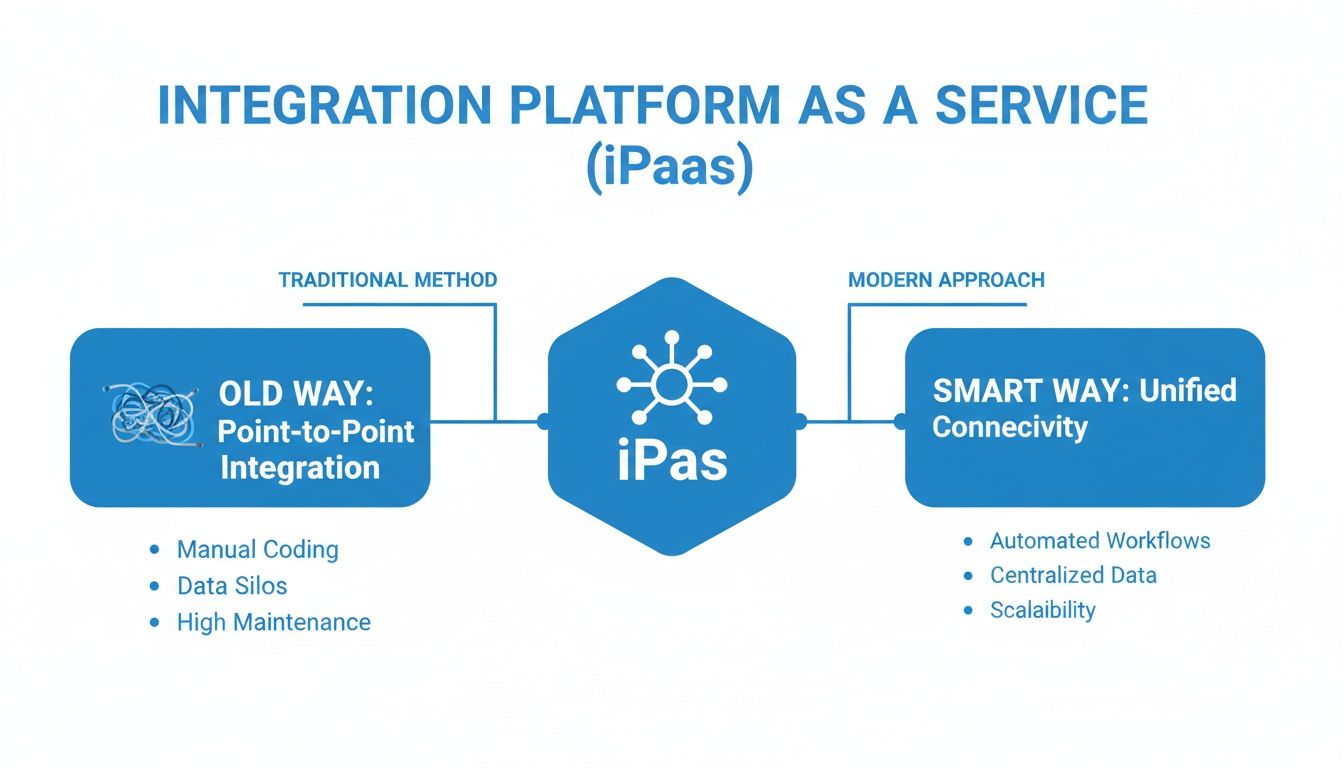
As you can see, one is a tangled nightmare to troubleshoot. The other is organized, scalable, and much easier to manage.
Okay, but what does a workflow actually do? Let's walk through a common scenario: automating order fulfillment.
Using your iPaaS, you'd build a workflow that starts with a trigger, like a new order placed on your website. The moment that happens, the platform springs into action.
First, it uses its connectors to pull the relevant data: the customer's name and address, the product SKU, and the order total. But that data might not be ready for your other systems. This is where the magic happens. The iPaaS can transform the data on the fly, like reformatting a shipping address to match your logistics provider's standard, or checking real-time stock levels in your ERP.
This middle step of cleaning and preparing data is absolutely critical. If you want to go deeper on how information is moved and reshaped between systems, check out our guide on the data pipeline and ETL process.
Finally, the workflow executes the actions. It sends the clean, formatted order data to all the right places: your warehouse management system to start the picking process, your accounting software to create an invoice, and your CRM to log the purchase against the customer's record.
This whole chain reaction runs automatically, 24/7, all kicked off by a single customer click. That ability to orchestrate complex, multi-step tasks across different apps is what makes an integration platform as a service an absolute game-changer for any growing business.
When you start shopping for an integration platform as a service, it's easy to get lost in a sea of technical jargon. The truth is, not all platforms are created equal.
The right one can become the central nervous system of your operations. The wrong one? It just turns into another expensive, unused subscription.
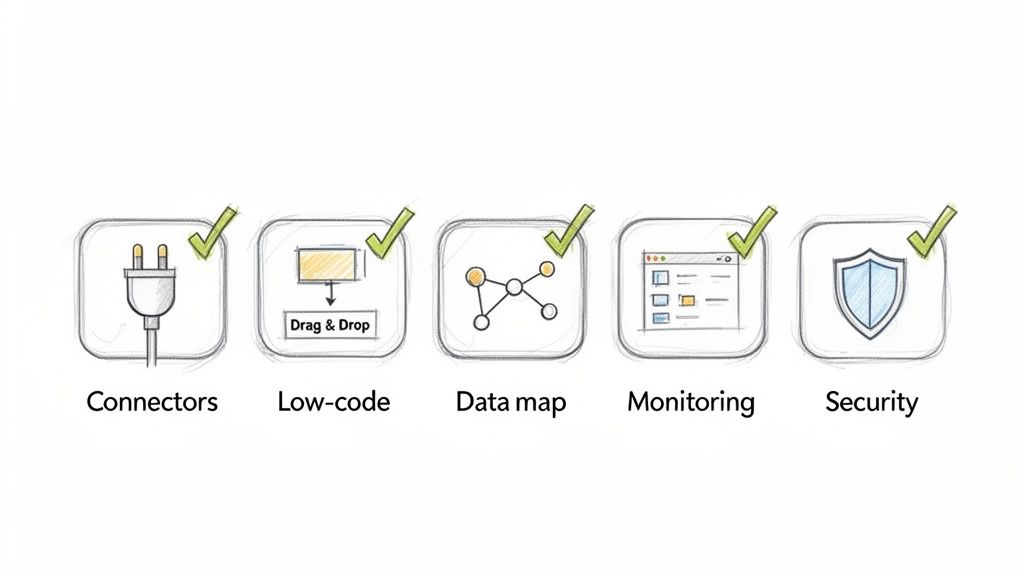
Let's cut through the noise. Here are the essential, non-negotiable features that separate a truly powerful iPaaS from the rest. Think of this as your checklist to make sure a platform has the muscle to support your business now and grow with you later.
The heart and soul of any iPaaS is its library of pre-built connectors. These are basically ready-made adapters that plug directly into the software you already use, from eCommerce platforms like Shopify to your ERP and CRM.
A massive library means you can connect your tech stack in minutes, not months. Without it, you’re right back where you started: paying developers for slow, expensive custom-coding projects.
For an eCommerce business, this means the iPaaS absolutely must connect to:
A deep connector library is non-negotiable. It’s the difference between a platform that works out of the box and one that creates more work for your IT team. The goal is to plug and play, not to build from scratch.
The best integration platforms are built for the people who actually run the business day-to-day. A low-code or no-code visual builder is a total game-changer here.
It lets non-technical users, like your operations managers or marketing team, build and manage their own automations. This is usually a drag-and-drop canvas where you can visually map out a workflow, set triggers (like "when a new order is placed"), and define the actions that follow.
No code required. This empowers your team to fix their own problems and frees up your developers to tackle much bigger projects.
Let's be honest, data is rarely in the right format. Your PIM might call a field "ProductName," but your eCommerce store needs it to be "title." This is where data mapping and transformation tools are critical.
A modern iPaaS has to let you easily map fields from one system to another and transform the data as it moves. This might be as simple as changing a date format or as complex as merging several fields into one.
This step ensures the information arriving at its destination is clean, correct, and ready to use. If you want to dive deeper into how data gets captured before this step, check out our post on the meaning of data ingestion.
When your business runs on automated workflows, you absolutely need to know the second something breaks. Real-time monitoring dashboards give you a live command center for all your integrations, showing what's running, what's finished, and most importantly, what failed.
But don't settle for a simple history log. You should demand:
This kind of visibility is what gives you peace of mind. Catching a data sync error before it messes up a single customer order is what separates a good operation from a great one.
Finally, an integration platform as a service handles your most sensitive business data. Security isn't just a feature; it's the foundation of the entire system.
The platform must provide robust protection for your information as it moves between applications. These aren't just "nice-to-haves," they're fundamental requirements.
Look for these essential security features:
Of course. Here is the rewritten section, adopting a natural, expert-written tone while preserving all original links, images, and key data points.
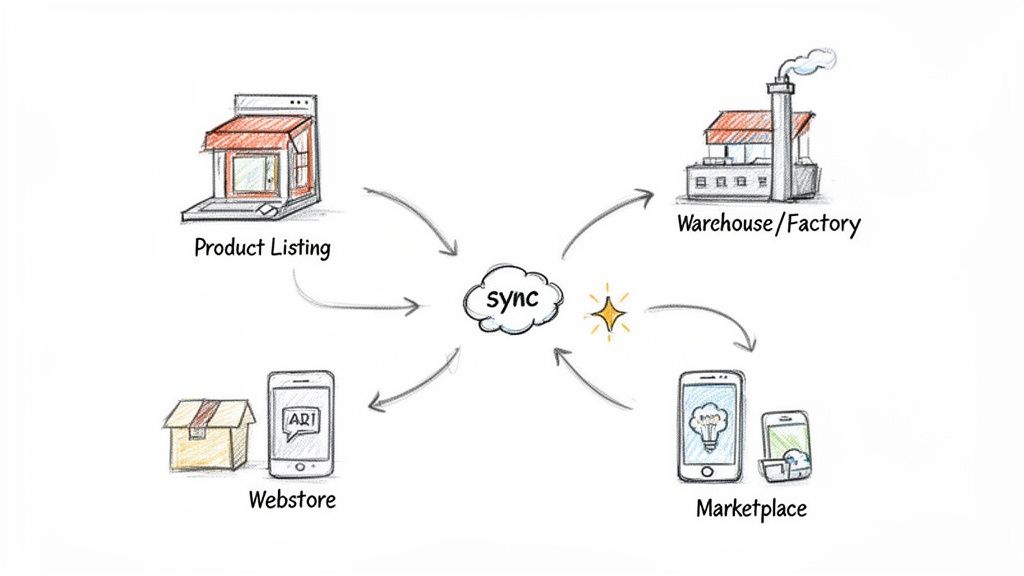
Talking about features is one thing, but seeing how an integration platform as a service works in the real world is where the lightbulb really goes on. For any eCommerce business, an iPaaS isn't just another piece of tech. It's the engine that actually powers a smooth, modern customer experience.
Let's step away from theory and look at some concrete, high-impact examples. These are the kinds of workflows that transform a growing business from a chaotic, manual operation into an automated and scalable one. You'll see exactly how an iPaaS wipes out tedious tasks, slashes your time-to-market, and frees up your team to focus on what matters: growth.
This is the classic, non-negotiable integration for any online seller. Imagine a customer buys the very last blue sweater from your website. Without an iPaaS, someone on your team has to scramble to manually update the inventory on your Amazon, eBay, and Walmart stores. If you’re too slow, you risk overselling, leading to canceled orders, angry customers, and a damaged reputation.
An iPaaS solves this problem completely. It allows you to build a simple workflow that looks something like this:
This all happens in seconds, without a single person having to lift a finger. The result is perfect inventory synchronization. No more overselling. Just happier customers who get what they ordered, every single time.
By connecting your sales channels to a central inventory system, an iPaaS creates a single source of truth for your stock levels. This isn't just about preventing errors; it's about building a reliable and trustworthy brand experience.
Getting a new product live on ten different channels can be a nightmare of spreadsheets, frantic copy-pasting, and inevitable mistakes. But when you pair an iPaaS with a Product Information Management (PIM) system, the whole process becomes incredibly efficient. You can learn more about how a PIM organizes all your product data in our guide on product information management.
A common workflow involves enriching product data before it ever goes live. For instance, when a new product is added to your PIM, the iPaaS can kick off an automated process.
It might send the basic product specs to an AI tool to generate compelling marketing descriptions. The iPaaS then takes that new copy, adds it back to the product record in the PIM, and flags it for a manager's approval. Once approved, the platform automatically pushes the complete, enriched listing to all your sales channels, formatted perfectly for each one.
An iPaaS isn't just for your customer-facing apps. It's powerful enough to connect your entire operational backbone, from the factory floor all the way to the final sale. Think about a business that juggles multiple suppliers.
You can use an iPaaS to build a workflow that connects your manufacturing ERP with a supplier portal. When your inventory levels for a crucial component drop below a set threshold, the iPaaS can automatically trigger a purchase order in your ERP and send it directly into the supplier's system.
This ensures your data is accurate from end to end, drastically reducing manual ordering errors and preventing stockouts that could grind production or sales to a halt.
This relentless drive for operational efficiency is exactly why the integration platform as a service market is exploding, especially in North America. The region’s dominance is fueled by retail giants and nimble businesses alike, all trying to optimize for huge marketplaces and increasingly complex supply chains.
Market.us reports that North America commands a 38.5% global share, with the US market alone valued at $3.68 billion in 2025 and projected to skyrocket to an incredible $116.09 billion by 2035. This massive adoption is driven by an urgent need for real-time data and digital agility, a space where platforms like NanoPIM excel by integrating crucial systems like ERPs and commerce sites. You can dive into the details in the full market research on Market.us.
Finally, an iPaaS is absolutely critical for actually understanding your customers. Right now, your customer data is probably scattered everywhere: your eCommerce platform, your CRM, your email marketing tool, and your support desk. This siloed mess makes it impossible to get a clear picture of any single customer.
An iPaaS workflow can pull all this information together into one place, usually your CRM.
Suddenly, your support and sales teams have a complete, chronological history of every interaction. This allows them to provide personalized, context-aware service that feels helpful, not robotic. This unified view turns a pile of fragmented data points into a powerful tool for building real, lasting customer relationships.
Picking an integration platform as a service is a major decision, but it doesn't need to be a stressful one. You aren't just buying another piece of software; you're selecting a partner that will act as the central nervous system for your entire operation. A smart choice can open up incredible efficiencies, but the wrong one will just lead to headaches and buyer's remorse.
The trick is to look right past the slick sales pitches and focus on what your business actually needs. It’s all about finding a platform that matches your team's skills, connects the apps you already depend on, and can scale up as you grow. Let's walk through a straightforward way to evaluate your options and make a choice you won't regret.
The very first test for any iPaaS is simple: can it talk to your software? A platform can boast about having thousands of connectors, but if it's missing the one for your specific ERP or PIM system, it’s useless to you.
Make a complete list of every critical application your business runs on. This means your eCommerce platform, CRM, inventory system, marketing automation tools, and any accounting software. Once you have that list, go through the connector library of each iPaaS vendor you’re considering. Don’t just glance at the logos on their website. Dig deeper to confirm the connector is fully featured and can perform the exact actions you need.
The depth and quality of pre-built connectors are the single most important factor in your decision. A robust library means you can get up and running quickly without sinking time and money into custom development projects.
Think about who will actually be building and managing these integrations day-to-day. If you have a squad of dedicated developers, a more code-heavy platform could work. But for most companies, the real win is empowering non-technical people, like operations managers or marketers, to create their own automations.
Look for a platform with an intuitive, visual builder that feels low-code or even no-code. When you're in a demo, ask them to build a common workflow for you right then and there. If it looks like you need an engineering degree just to follow along, it’s probably not the right choice for your "citizen integrators." The easier it is to use, the more your team will actually use it, and the faster you'll see a return on your investment.
Your business doesn’t stand still, and your iPaaS needs to be able to keep pace. Think about your absolute busiest moments, like Black Friday weekend or a huge product launch. Can the platform handle a sudden surge of thousands of orders without breaking a sweat, slowing down, or crashing?
Ask potential vendors direct questions about their architecture and performance guarantees.
A platform that chokes under pressure can bring your entire business to a halt. For instance, a massive financial services company like Visa moved to Azure Logic Apps to bring together over 100 different systems. This move boosted their integration efficiency by 30% and gave them the power to scale their operations globally.
To make your evaluation process easier, use a checklist to compare your options side-by-side. This helps turn a complicated decision into a clear, data-driven comparison based on what you actually need.
Here is a simple checklist you can use to grade potential iPaaS providers.
iPaaS Vendor Evaluation Checklist
| Evaluation Criteria | What to Look For | Why It Matters for Your Team |
|---|---|---|
| Connector Library | Does it have pre-built connectors for all your critical apps (ERP, PIM, CRM, etc.)? | Avoids expensive and slow custom development projects. |
| Ease of Use | Is the interface intuitive enough for non-technical users to build workflows? | Empowers your operations team to solve their own problems. |
| Scalability | Can it handle your peak transaction volumes without performance issues? | Ensures your business runs smoothly during your busiest sales periods. |
| Security & Compliance | Does the vendor hold key certifications like SOC 2, GDPR, or HIPAA? | Protects your sensitive business and customer data from breaches. |
| Support & Onboarding | What level of support is included? Is there a dedicated success manager? | Guarantees you have expert help when you encounter an issue. |
| Pricing Model | Is the pricing predictable? Does it align with how your business grows? | Prevents surprise bills and ensures the cost is tied to the value you receive. |
By working through these criteria methodically, you can cut through the marketing noise and confidently select an integration platform as a service that will be a genuine asset for your business for years to come.
Even with a solid grasp of the basics, it’s natural to have a few lingering questions about what an Integration Platform as a Service can really do. Let's tackle some of the most common ones head-on.
Not too long ago, connecting your systems meant buying bulky, on-site servers and paying a team of developers to write custom code from scratch. It was a slow, expensive process, and making even a small change felt like performing open-heart surgery on your tech stack.
An integration platform as a service flips that model on its head. It’s a cloud-based service you subscribe to, equipped with pre-built connectors and visual dashboards. This makes it faster, far more flexible, and accessible to the business teams who actually need the integrations.
Think of it like this: the old way was like trying to build a car engine from raw metal. The iPaaS approach is like getting a high-performance, plug-and-play engine delivered to your garage, ready to install.
Absolutely. Security isn't just a feature for iPaaS providers; it's the foundation of their business. They invest enormous resources into protecting their customers’ data because their reputation depends on it.
You should always double-check a vendor’s specific security certifications, but modern iPaaS solutions are built from the ground up to handle sensitive business data securely.
It can vary, but the whole point of most modern platforms is to empower "citizen integrators." These are your eCommerce managers, marketing specialists, and operations leads. They are people who understand the business need inside and out but don’t write code for a living.
With drag-and-drop interfaces, you can build surprisingly powerful automations without touching a single line of code. While a highly complex, enterprise-wide project might still need a little help from IT, the day-to-day work of connecting apps and managing workflows can finally be handled by the people who know the business best.
No, and it’s not designed to. An iPaaS doesn't replace foundational systems like your Product Information Management (PIM) or Enterprise Resource Planning (ERP). Instead, it acts as the universal translator that connects them all, making each one more effective.
Your PIM is the central source of truth for product information, and your ERP is the backbone of your business operations. The iPaaS is the connective tissue that ensures data flows between them, and everywhere else, accurately and automatically, without you having to lift a finger.
Ready to see how a modern PIM acts as the perfect hub for your integration strategy? With NanoPIM, you can centralize all your product data and then use an iPaaS to sync it flawlessly across your entire ecosystem. Learn more and see how we power up your integrations.


