

Your team is probably already doing data integration in the cloud. It just doesn't feel like a strategy yet.
It feels like CSV exports from an ERP. A shared drive full of product images. A marketplace specialist maintaining Amazon attributes in a side spreadsheet. A merchandiser fixing titles directly in Shopify because the upstream system can't move fast enough. Then launch week hits, and everyone discovers the same SKU exists in four versions with three different descriptions and two image sets.
That mess doesn't stay in operations. It leaks into search visibility, returns, ad performance, and time-to-market. When product data is fragmented, every new channel multiplies the cleanup work.
A common retail pattern looks harmless at first.
Core specs live in an ERP. Marketing copy sits in Google Docs. Lifestyle images are in a DAM or, worse, on someone's local machine. Marketplace-specific fields for Amazon, Google, and eBay are tracked separately because each channel wants slightly different formatting, different character limits, and different attribute logic. By the time a product goes live, the business has created a shadow system made of files, chat messages, and manual fixes.
That setup creates two kinds of damage. The first is obvious. Teams publish inconsistent data. The second is quieter. Teams stop trusting the source systems, so they build more workarounds.
A product manager updates dimensions in the ERP. The eCommerce team doesn't see it until the next export. The marketplace team already wrote bullets based on the old specs. The designer uploaded a new hero image, but only the website got it. Amazon still shows the old pack shot. Customer support gets the fallout when buyers receive something different from what the listing implied.
This isn't a niche problem. The broader market keeps moving in this direction because companies need cloud tools to unify scattered systems. The global data integration market reached $15.18 billion in 2024 and is projected to reach $30.27 billion by 2030, while 94% of organizations now use cloud services in some capacity, according to Integrate.io's cloud ETL market analysis.
Spreadsheets work when the catalog is small and the team is sitting close together. They break when you add variants, digital assets, channel rules, localization, and approval workflows.
A single jacket isn't just a jacket anymore. It's sizes, colors, material claims, care instructions, image renditions, video, alt text, bullets, backend search terms, regional compliance notes, and seasonal campaign messaging. If each piece lives in a different place, the business isn't managing data. It's chasing it.
Practical rule: If your team has to ask "which file is the latest one?" more than once a week, you don't have an information flow. You have a risk pattern.
The fix isn't "buy another connector" and hope for the best. The fix is to treat product data as an operating system for commerce. That starts with shared rules for ownership, naming, approvals, and quality. If you're trying to formalize that side of the work, this data governance framework is a useful starting point because it forces the team to decide who owns what before automation spreads bad data faster.
Cloud integration matters because it gives you a way to connect systems without building a brittle point-to-point mess. Done well, it turns launch chaos into a repeatable pipeline.
Data integration in the cloud is the practice of moving, aligning, and updating data across systems using cloud-based services and infrastructure. In plain English, it's how your ERP, PIM, DAM, analytics stack, commerce platform, and marketplaces stop speaking past each other.
A simple analogy helps. Think of it as a universal translator at the center of your product data ecosystem. Each system has its own language, field structure, and timing. One system says "color_name." Another says "shade." Another stores values as free text. Another requires a controlled list. Cloud integration translates, maps, and routes that information so the right version reaches the right destination.
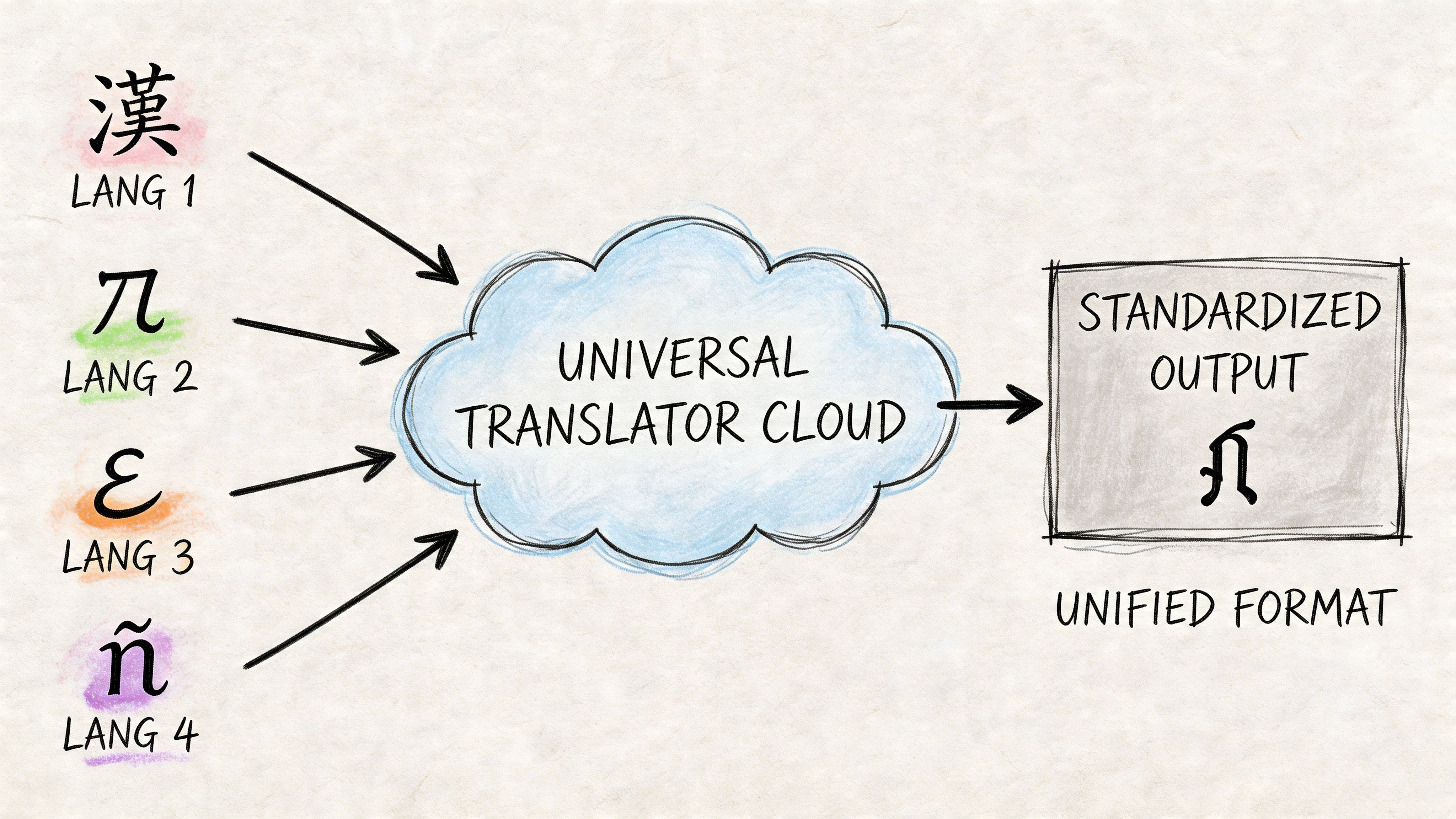
Older on-premise integration usually meant custom pipelines between specific systems. That works until the business adds another marketplace, another region, or another data source. Then every new connection becomes another maintenance problem.
Cloud platforms changed that model. They made it easier to connect APIs, object storage, streaming systems, warehouses, and SaaS tools without hosting every piece yourself. The shift is already well underway. 60% of all corporate data is now stored in the cloud as of 2025, up from 25% in 2015, and 96% of companies report using public cloud services in some capacity, according to N2WS cloud computing statistics.
That matters for eCommerce because product data rarely sits in one clean application. Even a mid-sized brand might have:
The goal isn't just "move data." Plenty of bad architectures move data all day long.
The primary goal is to create a reliable product truth with controlled distribution. That means teams know where raw data enters, where enrichment happens, where approvals happen, and which systems are allowed to publish outward. In a healthy setup, an attribute change doesn't require three people to manually rekey the same information across multiple tools.
A good cloud integration design usually does four things well:
Ingests data from messy sources
Supplier sheets, ERP exports, API feeds, and asset libraries all come in with different structures.
Normalizes it into a model the business can use
Sizes, colors, variants, and compatibility fields need consistent rules.
Routes it to the right destinations
Your website, feeds, ad platforms, and marketplaces each need different output formats.
Tracks what changed and why
Without auditability, fixes become guesswork.
Cloud integration isn't valuable because it's modern. It's valuable because it reduces the number of places where a human has to remember what changed.
A central hub model usually works better than ad hoc syncs. If every system pushes directly to every other system, errors become hard to trace. When product content passes through a controlled center, teams can validate and enrich before publishing.
What doesn't work is treating product data like generic back-office data. Orders and payments often need transactional precision and immediate consistency. Product information has a different rhythm. It changes in batches, needs review, carries creative assets, and often requires channel-specific shaping before publication. That's why product-centric integration needs its own design choices, not a copy-paste from finance architecture.
When teams talk about data integration in the cloud, they're often mixing several different architecture patterns together. That creates confusion fast. ETL, ELT, Reverse ETL, and iPaaS aren't competing buzzwords. They solve different problems.
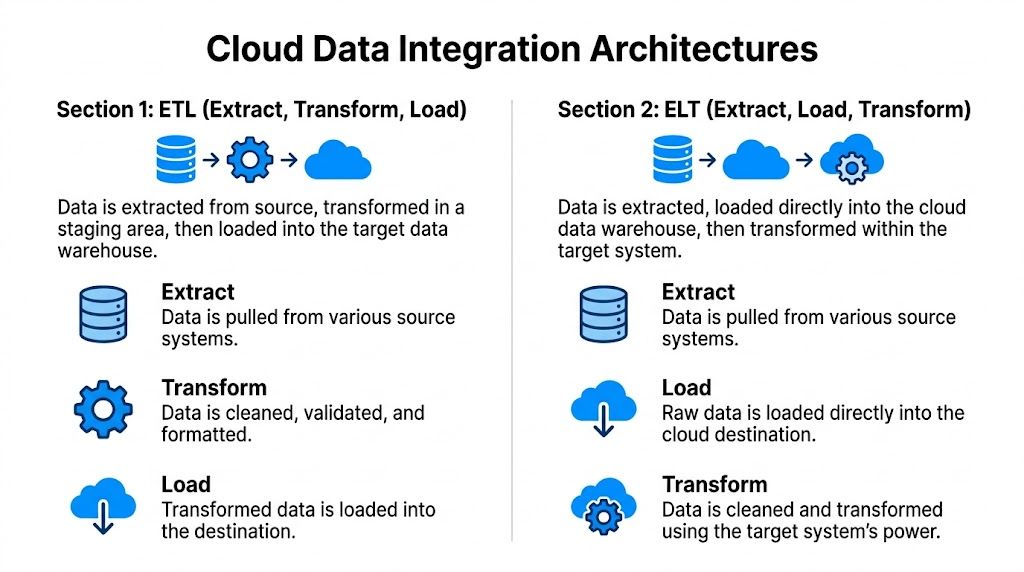
ETL stands for Extract, Transform, Load.
This is the classic model. You pull data from source systems, clean and restructure it in a staging layer, then load the polished version into the target. For product data, ETL makes sense when the destination expects strict formatting and you don't want dirty records landing there at all.
Think of ETL like prepping ingredients before they reach the kitchen line. By the time they arrive, the onions are chopped and the sauce is portioned.
ETL fits well when:
The trade-off is speed and flexibility. ETL can become rigid if every new data field requires transformation logic before anything flows.
ELT means Extract, Load, Transform.
In this pattern, you move raw data into a cloud destination first, then transform it there. This works well with modern cloud warehouses and lakehouse-style environments where storage and compute are more flexible.
A retail team might load raw supplier catalogs, ERP exports, and channel performance data into one cloud environment, then create transformed product views for merchandising, SEO, and analytics from the same underlying pool.
ELT is usually the better fit when:
| Pattern | Best use | Main strength | Main risk |
|---|---|---|---|
| ETL | Clean operational handoffs | Strong validation before publish | Slower change cycles |
| ELT | Analytics and flexible modeling | Raw data kept for reuse | Mess can spread if governance is weak |
ELT often wins for analytics-heavy environments because you preserve raw data and can rework transformation logic later. But if nobody owns schema standards, teams end up loading junk into the cloud and calling it progress.
If your analysts keep asking for "the raw feed before anyone touched it," you're usually dealing with an ELT-friendly problem.
Reverse ETL takes modeled data from a warehouse or central data platform and pushes it back into operational tools.
For eCommerce, that can mean taking a curated product score, completeness flag, or merchandising priority from the analytics environment and sending it into your PIM, CRM, ad platform, or feed management tool. This closes the loop between analysis and execution.
A practical example is pushing a "missing image" or "incomplete attribute set" flag back to the team that owns listing quality. Another is syncing a product performance segment so the marketplace team can prioritize top movers for richer content updates.
Reverse ETL is powerful, but it's easy to misuse. Warehouses are good at analysis, not always at serving as the long-term owner of operational business rules. If teams keep writing product logic in SQL and spraying outputs across tools, they may avoid one silo while creating another.
iPaaS, or Integration Platform as a Service, gives teams a managed way to connect systems through connectors, workflows, mapping tools, and orchestration features. It's often the fastest route when the goal is to connect many business applications without building every integration from scratch.
For product operations, iPaaS can handle jobs like syncing ERP records into a PIM, moving approved media metadata into a DAM workflow, or pushing channel-ready content to marketplaces. If you want a useful breakdown of where this model fits, NanoPIM's guide to integration platform as a service is a solid reference.
Most mature teams don't pick one pattern forever. They mix them.
A good real-world signal comes from eBay's hybrid multi-cloud approach. eBay uses AWS for general compute and storage, Google Cloud for advanced analytics and machine learning, and tools like Apache Kafka to orchestrate data flow across platforms, as described in AppseConnect's overview of cloud integration challenges. That's a reminder that architecture isn't just about moving data. It's about matching the pattern to the workload.
For product teams, the winning design is rarely the most complex one. It's the one that makes source data easier to trust and downstream publishing easier to control.
Generic integration advice usually falls apart once product data enters the conversation.
Product data isn't just rows in a table. It has hierarchy, inheritance, variants, media, channel rules, and approval logic. A single parent SKU can spawn dozens of sellable variants. Each one may share some attributes, override others, and require its own images or compliance notes. That's why product-centric integration needs a different operating model than a standard customer or finance sync.
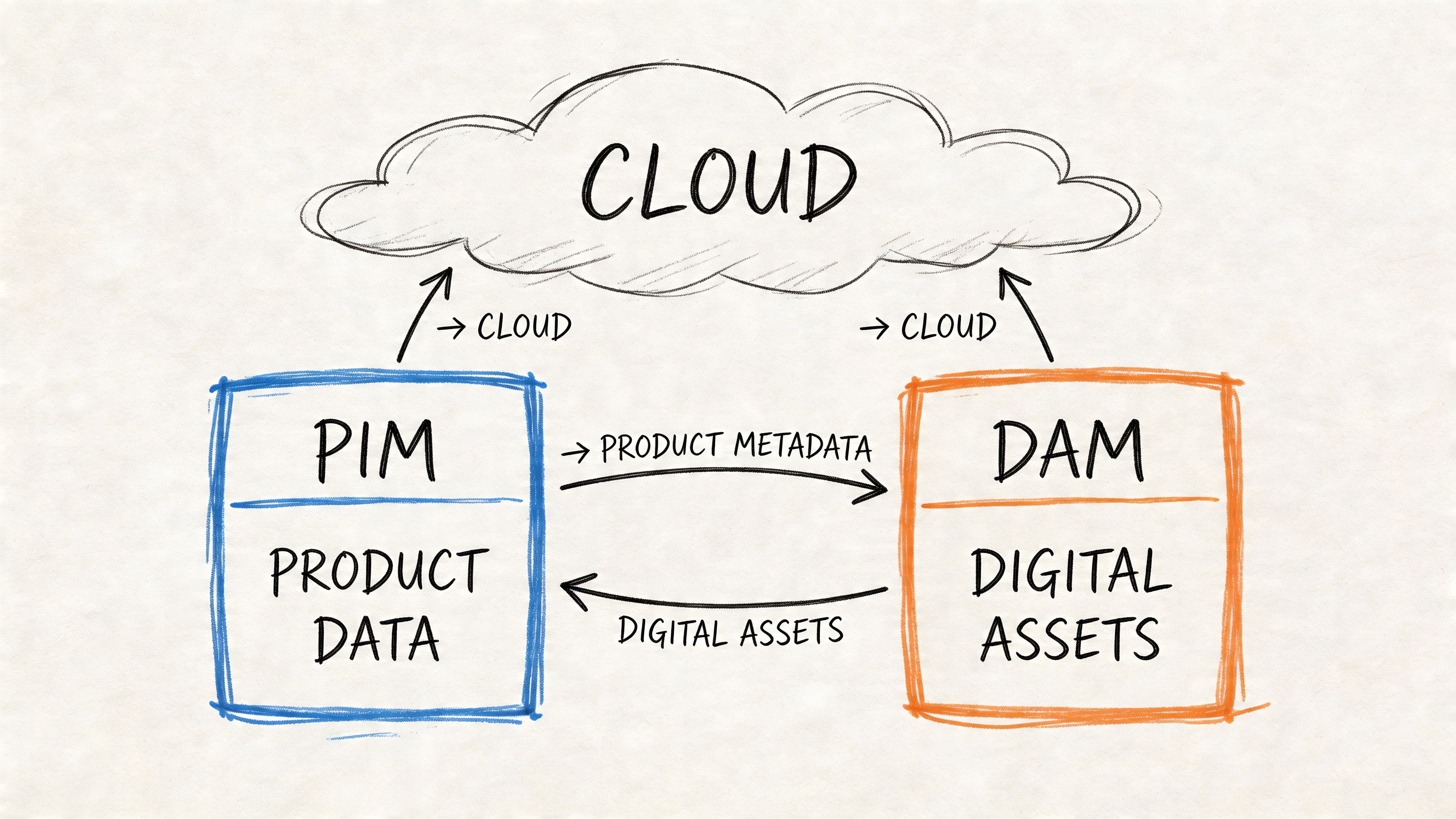
A useful way to think about it is as a content supply chain. Raw specs come in upstream. They get validated, enriched, approved, packaged, and distributed downstream.
The usual breakpoints are predictable.
The ERP knows the item exists, but not how to sell it. The DAM stores assets, but not always the exact channel-ready mapping between asset and SKU variant. The commerce platform wants a clean payload right now. Marketplaces want fields shaped to their own taxonomy. Internal teams want to review changes before publication, especially when copy or claims are generated or rewritten.
This is why 68% of omnichannel retailers face data silos in their product catalogs, and why multi-cloud setups can make the problem worse through latency and egress costs, according to Integrate.io's guide to cloud data integration.
In a product-centered design, data should move through a controlled sequence rather than bouncing randomly between endpoints.
Source intake
Manufacturer feeds, ERP records, spreadsheets, and existing platform exports enter the pipeline.
Holding and comparison
Incoming records should pause in a review layer where the team can compare old and new values before merging.
Normalization and enrichment
Shared attributes get standardized. Variant relationships get resolved. Asset metadata gets aligned to products.
Human review
Merchandising, compliance, or marketplace specialists approve what matters before release.
Channel publishing
The final outputs are shaped for Shopify, Amazon, Google, eBay, or any other endpoint.
The safest product integration pattern is simple. Raw data lands first, people review important changes, and only approved data gets published outward.
Many teams skip this and regret it.
If every inbound feed writes directly into the live catalog, one bad supplier file can overwrite dimensions, wipe bullets, or misassign assets. A holding layer gives the business room to inspect differences before they become customer-facing. It also helps when multiple systems claim authority over overlapping fields.
For example, an ERP may own weights and dimensions. The content team may own titles and bullets. A DAM may own asset references. A marketplace team may own channel-specific overrides. Without field-level ownership and a safe merge process, each sync risks trampling someone else's work.
This doesn't mean humans should touch every record forever. That would destroy the efficiency gains.
It means the system should automate the routine work and route exceptions to people who can judge them. New categories, missing attributes, conflicting updates, and risky content changes deserve review. Stable fields with clear source authority usually don't.
The short demo below gives a feel for what modern product workflow design can look like when data and approvals are connected instead of scattered.
When this ecosystem is connected properly, launch work gets calmer.
The merch team stops retyping. The marketplace team gets channel-ready outputs instead of raw exports. Designers can manage assets without becoming spreadsheet librarians. Operations can see which products are complete, which are blocked, and which are ready to publish.
The gain isn't just cleaner data. It's faster movement from raw product information to usable selling content.
A pipeline that moves product data quickly but publishes bad, incomplete, or unauthorized changes is not a good pipeline. It's a fast way to lose revenue and trust.
Security and reliability tend to get framed as technical hygiene. For commerce teams, they're closer to revenue protection. If a feed failure wipes bullets from a top category, or if the wrong team can overwrite regulated product claims, the issue isn't abstract. Customers see it immediately.
Most integration failures aren't dramatic infrastructure events. They're ownership failures.
Nobody decided which system owns dimensions. Two teams can edit the same field. A connector retries forever and republishes stale data. An inbound feed changes column names and no alert fires. The pipeline is technically "running," but the business is already off the rails.
A reliable pipeline has clear answers to these questions:
Product data may not sound sensitive compared with payments or identity records, but it still carries risk. Pricing, launch schedules, restricted claims, vendor documentation, and licensed media all need controlled access.
At minimum, teams should enforce:
That last point matters more than many teams realize. Audit trails don't just help with compliance. They cut diagnosis time when a listing suddenly changes and nobody knows why.
Bad data rarely arrives with a warning label. Monitoring is how you catch it before shoppers do.
A lot of teams monitor jobs, not outcomes.
Yes, you should know whether a pipeline succeeded. But you also need to know whether it succeeded in a meaningful way. A successful run that publishes blank image references or strips variant links is still a failure from the business point of view.
Useful monitoring usually includes a mix of technical and operational checks:
| Monitor | Why it matters for commerce |
|---|---|
| Schema changes | Prevents source updates from silently breaking mappings |
| Missing required attributes | Stops incomplete listings from going live |
| Unexpected volume shifts | Flags duplicate loads or missing product batches |
| Asset linkage failures | Catches products with images stored but not attached |
| Publish lag | Exposes delays between approval and channel availability |
If you're tightening your operating model, this roundup of Data Engineering Best Practices is worth reviewing alongside your product workflows. It covers the kind of scalable, secure design habits that keep integrations maintainable instead of fragile.
Teams don't need a perfect architecture diagram. They need a system that fails safely.
That usually means staging before publish, approval gates for risky edits, rollback options, and alerts that route to the right owner. It also means documenting the pipeline in language the business can understand, not just in developer tooling.
If your team is redesigning this layer, NanoPIM's article on data pipeline ETL is a useful companion read because it frames pipeline design around practical flow control instead of theory.
The strongest cloud pipelines share one trait. They assume things will go wrong and are built to make those moments visible, contained, and reversible.
Most failed cloud integration projects don't fail because the idea was wrong. They fail because the team tried to migrate everything at once, copied old messes into new tools, or ignored cost behavior until the invoices arrived.
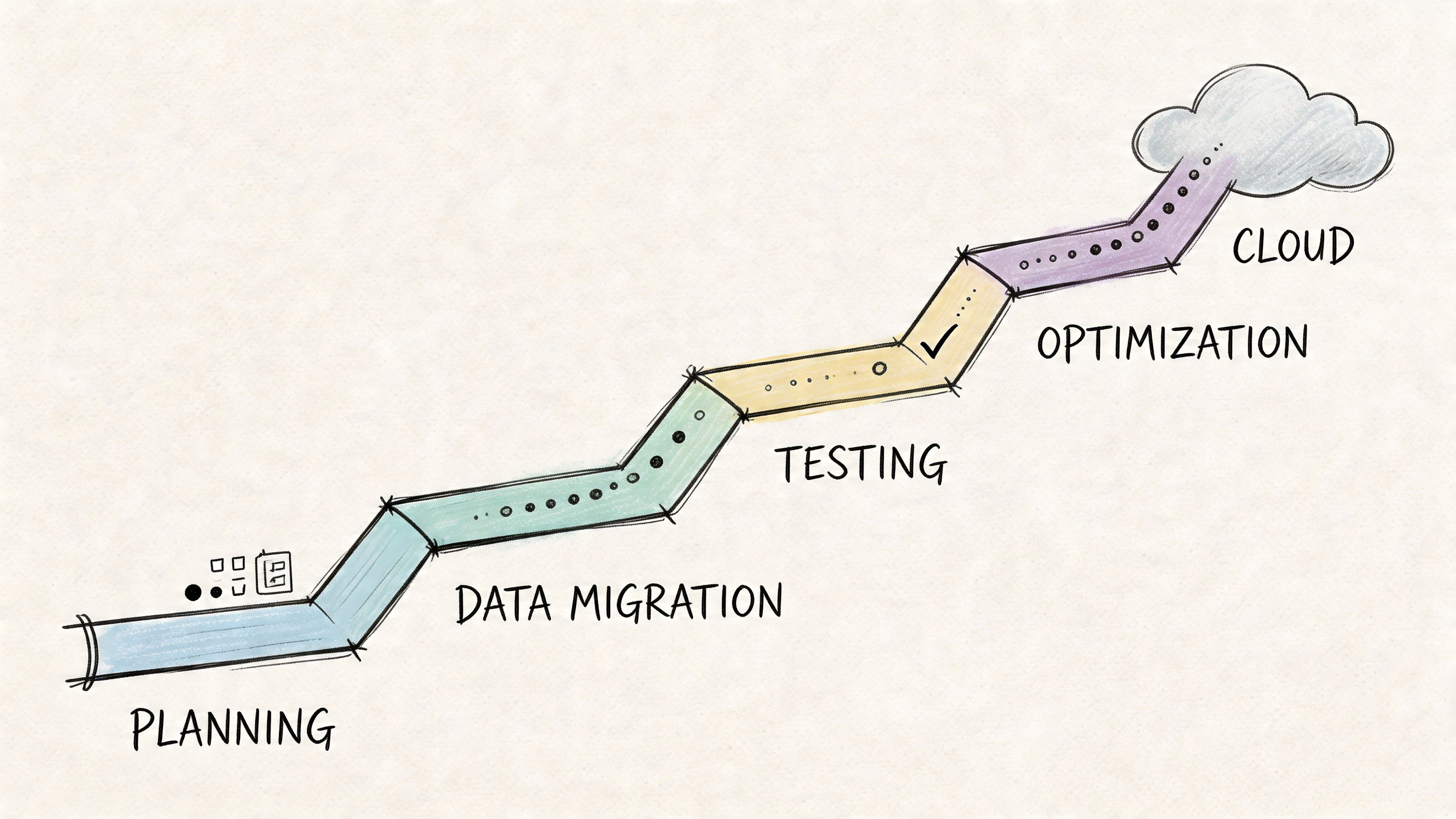
A practical migration plan is less about heroics and more about sequencing. Start with the systems and workflows that create the most daily friction, then build outward.
Before choosing platforms, map the current estate.
List every source of product truth, every export in circulation, every manual patch, every marketplace feed, and every place assets are stored. Then mark which fields each source should properly own. This is the work many teams rush through, and it's exactly why migrations later bog down in rework.
A useful audit should answer:
Don't start with "integrate all product data."
Start with a bounded outcome like "centralize catalog intake from ERP and publish approved content to Shopify and one marketplace" or "standardize asset-to-SKU matching for one product family." Narrow scope gives the team a chance to prove the model before scaling it.
Migration projects move faster when the first win is operational, not architectural. Pick the workflow that wastes the most time today.
Retail teams often get burned when they buy for peak ambition instead of actual operating rhythm.
Seasonal businesses have spiky workloads. Catalog expansion, promotional refreshes, asset delivery, and AI-assisted enrichment don't happen evenly throughout the year. A pricing model built around fixed capacity can feel fine in a demo and painful in practice. Cost discipline matters because 55% of mid-market firms overspend due to unmonitored data egress and over-provisioning, according to RudderStack's data integration trends analysis.
When evaluating platforms, ask:
| Decision area | Better question to ask |
|---|---|
| Sync pricing | Does cost rise with actual sync volume or with provisioned capacity? |
| Storage model | What happens to cost when asset counts and versions grow? |
| AI usage | Are enrichment actions priced transparently or bundled opaquely? |
| Cross-cloud movement | Where do egress charges show up in real workflows? |
For retail, transparent usage-based pricing often aligns better than blunt fixed tiers because demand isn't flat. If you're mapping that journey, NanoPIM's guide on migrating data to the cloud is a helpful planning reference.
A phased rollout beats a big-bang launch almost every time.
One sensible sequence is to ingest first, normalize second, publish third, and automate exception handling last. That lets the team inspect data quality before they trust downstream automation. It also gives merchandisers and channel owners time to adjust to the new workflow.
A practical rollout often looks like this:
A migration is not complete when the connector works.
The team needs to know how to review exceptions, resolve conflicts, trace publish history, and update mappings when sources change. Commerce operations, merchandising, content, and IT should all understand the new responsibilities. Otherwise the system slowly drifts back toward shadow spreadsheets.
The best checklist is the one your team can run every week. Keep it visible, keep scope disciplined, and tie every technical choice back to time-to-market, content quality, and cost control.
When teams talk about cloud modernization, they often focus on tooling first. The bigger shift is operational. Data integration in the cloud gives product teams a way to move from reactive cleanup to managed flow.
That matters because product data isn't static. New channels appear. Marketplace requirements change. Asset volumes grow. AI-assisted enrichment adds speed, but also raises the need for approval and control. Without a strong foundation, every new capability adds another layer of mess.
A future-proof setup has a few consistent traits. It separates source ownership from channel output. It gives raw data a safe place to land before merge. It treats approval and auditability as part of the pipeline, not as an afterthought. And it aligns cost with actual workload so seasonal spikes don't punish the business for months of idle capacity.
The practical takeaway is simple. Don't start by asking which integration buzzword is hottest. Start by asking where product truth should live, who owns each field, which workflows need review, and how data should move to each selling channel. Build from there.
If you get those decisions right, faster launches and stronger product content follow naturally. So do cleaner feeds, calmer teams, and better readiness for whatever comes next.
If you're evaluating a product-focused approach to cloud integration, NanoPIM is worth a look. It combines PIM and DAM in one hub, supports human-in-the-loop review and safe data merging, and uses transparent token-based pricing so storage, syncing, AI actions, and asset delivery can scale with real catalog demand instead of fixed overhead.


