

A product detail page (PDP) is the single most important moment in ecommerce. It's the final, make-or-break conversation you have with a customer before they decide to buy. Forget thinking of it as just another page on your site; it is your best salesperson, working 24/7.
And its only job is to close the deal.

Think about shopping in a real, physical store. You can feel the fabric, pick up the gadget, and ask a helpful employee questions. A great PDP has to do all of that heavy lifting digitally, erasing the doubt that comes with buying something sight-unseen.
This one page is responsible for building trust from scratch, answering questions the shopper has not even thought of yet, and giving them the final nudge they need to click "Add to Cart." In a sea of online options, your PDP is where you win or lose.
A truly effective product page does more than list specs and features, it tells a story. It has to connect with what the customer actually needs and paint a crystal-clear picture of how your product is the solution.
This is not just a nice-to-have. A staggering 88% of shoppers report that detailed product content is an absolute must before they will make a purchase. When people cannot physically interact with your products, rich, accurate, and compelling information is not just helpful. It’s everything.
A great product detail page anticipates and answers every customer question before they even have to ask. It’s all about removing doubt to build the confidence they need to make that purchase.
Every single element on the page, from the title down to the last customer review, plays a role. One blurry photo, a confusing sentence, or a missing detail can be all it takes to send a potential buyer clicking over to your competitor.
So, what jobs does a high-converting PDP actually do? It all boils down to a few core functions that work together to move the customer from "just looking" to "just bought."
This table breaks down the essential roles your product page must fill.
| Function | Impact On Customer | Business Benefit |
|---|---|---|
| Informing | Gives them all the facts, specs, materials, how-to-use guides, so they feel confident. | Reduces returns and support tickets by setting clear expectations. |
| Connecting Emotionally | Helps them visualize the product in their own life through great visuals and stories. | Creates a stronger brand connection and desire for the product. |
| Building Trust | Uses reviews, ratings, and testimonials to show that other people love the product. | Lowers purchase anxiety and validates their decision to buy from you. |
| Driving Action | Makes the next step obvious with a clear price, shipping info, and a bold call to action. | Creates a smooth, frictionless path to checkout, increasing sales. |
Each function builds on the last, creating a powerful case for your product. For instance, informing a customer with a great description is critical. Our guide on how to write product descriptions can show you how to nail that part.
Ultimately, getting your product detail pages right is one of the highest-impact investments you can make for your brand. It’s where the magic happens.
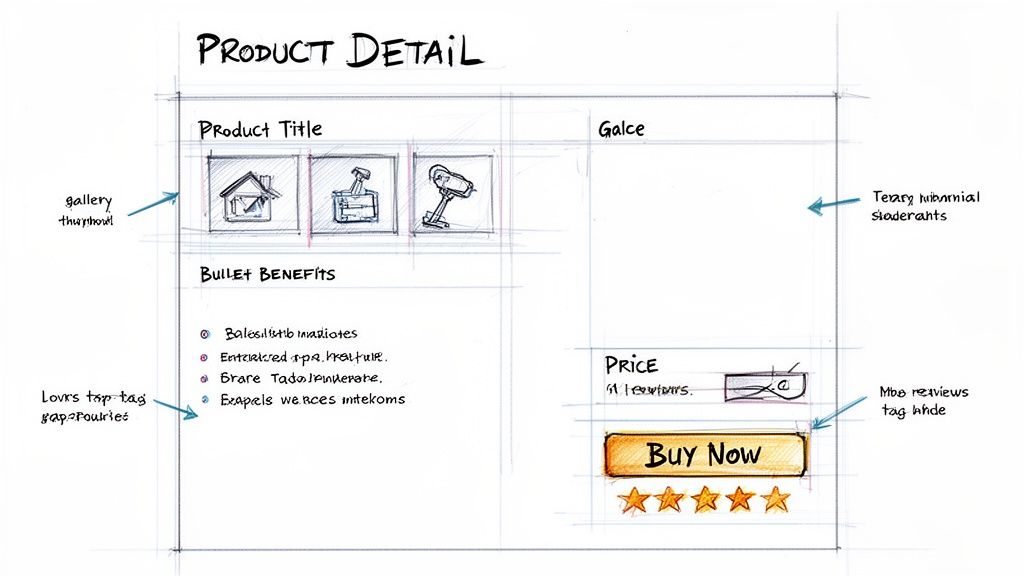
Think of your product detail page (PDP) as your best salesperson. It’s got one job: to greet a potential customer, answer all their questions, build their trust, and guide them to make a purchase. When every element works together, it’s a conversion powerhouse.
Each component has a specific role, from the images they see first to the shipping details they check last. Behind the scenes, a solid product information management system is what keeps all this data consistent and accurate, acting as the single source of truth.
Let's break down the essential parts. You can use this blueprint to audit your current pages or build new ones from scratch, making sure you are not leaving any sales on the table.
Before a customer reads a single word, they see your product. Their first impression is purely visual. That is why top-notch media is not just a nice-to-have; it is the cost of entry.
The data on this is overwhelming. A staggering 83% of shoppers say product images are the single most influential factor in their buying decision, more important than descriptions or even reviews. Another 67% prefer high-definition visuals over just text, and a product video can convince up to 64% of shoppers to click "buy."
Here is how to get the visual and text fundamentals right:
Once your visuals have grabbed their attention, your words have to close the deal. This is your chance to connect the dots between your product's features and the customer's real-world needs. You’re painting a picture of how this item will solve their problem or make their life better.
Nobody wants to read a wall of text. It is an instant turn-off that sends shoppers scrambling for the back button. Instead, make your content scannable. A short, engaging paragraph followed by benefit-driven bullet points is the winning combo.
The goal of a product description is not just to describe the product; it's to sell the solution. Translate every feature into a direct benefit for the customer.
For example, do not just write "lithium-ion battery." Instead, say, "Enjoy up to 10 hours of uninterrupted use on a single charge." That is the kind of benefit-focused language that drives conversions.
People are naturally skeptical online. They are actively looking for reasons to trust you and your products. They want to see that other people have bought this item and were happy with their purchase. That’s the power of social proof, and it is absolutely critical.
At the same time, you have to make the next step painfully obvious. Confusion is the ultimate conversion killer. If a shopper has to hunt for the price, wonder if an item is in stock, or guess your return policy, you are likely to lose them.
Here are the final pieces of the puzzle that build trust and drive action:
Who are you building your product page for? The shopper or the search engine?
It’s a trick question. The answer has to be both. For years, people treated SEO and user experience as separate disciplines, but that’s an outdated way of thinking. A great product page does not just rank well; it sells well.
Think of it this way: SEO is what gets people in the door. A fantastic user experience is what convinces them to stay and make a purchase. These two goals do not just coexist, they feed each other.
Let’s break down how to nail both sides of this coin.
First things first, search engines like Google need to be able to find and understand your product page. This is not about trickery; it is about speaking their language with clear technical signals so they can do their job.
Without a solid SEO foundation, even the most beautiful, persuasive page will be shouting into the void.
Once a shopper lands on your page, the focus shifts completely. SEO did its job and brought them to you. Now, you have to earn the sale. A slow, confusing, or clunky page is a conversion killer.
How much does it matter? Studies have shown that a page load delay of just one second can slash conversions by 7%. In ecommerce, patience is not a virtue.
Optimizing for the user is no longer a 'nice-to-have', it's a core part of modern SEO. Search engines want to send people to pages they'll actually love, so a great user experience directly boosts your visibility and your sales.
A smooth journey from discovery to checkout builds trust. Here is what to focus on:
By weaving strong technical SEO together with a user-first design, you create a powerful flywheel. Good SEO brings in traffic, a great experience converts that traffic into happy customers, and those happy customers send positive signals back to search engines, boosting your rankings even further.
For a deeper look into this, our complete guide to SEO for products covers even more advanced strategies.
If you are using a one-size-fits-all strategy for your product detail pages, you are leaving money on the table. It is a simple truth. Shoppers on Amazon just do not behave the same way as people browsing Google Shopping, and each platform plays by its own set of rules.
Treating them as identical is a surefire way to hurt your visibility and kill your conversion rates.
To actually win on these channels, you have to think like a specialist. Customizing your product content is not just a nice-to-have; it is fundamental. Think of it like speaking the local dialect. You are saying the same thing, but you are tweaking your tone and phrasing to connect with the audience in front of you.
This is where having a single source of truth for your product content becomes absolutely critical. A PIM system acts as your command center, letting you create and fine-tune channel-specific content without drowning in a sea of disconnected spreadsheets.
Amazon is its own universe. Shoppers arrive with a high intent to buy, and your main job is to cut through the noise of thousands of direct competitors. This means you have to go beyond the basics and use Amazon's own powerful tools to your advantage.
The real game-changer here is A+ Content. This feature lets you replace the standard, boring text description with rich media, detailed comparison charts, and compelling brand stories. It’s your chance to build a mini-landing page right inside your product listing.
Beyond what the customer sees, you also need to nail your backend search terms. These are the hidden keywords that feed Amazon's A9 search algorithm. Fill this space with relevant synonyms, long-tail phrases, and even common misspellings you would never want to clutter your title with. For a much deeper dive, check out our guide on Amazon product listing optimization.
Google Shopping is a different beast entirely. It is a massive comparison engine that functions by pulling product information directly from a data feed that you provide. Success here is not about branded flair on the page; it is about the cold, hard quality of the data you submit.
Your product data feed is the bedrock of your entire Google Shopping strategy. If that data is messy, incomplete, or wrong, your products either will not show up for the right searches or, worse, they will get disapproved completely.
Think of your Google Shopping data feed as your product's DNA. If it's accurate and complete, Google can match it perfectly with a searching shopper. If it's flawed, your product becomes invisible.
Here are the most critical pieces of your Google Shopping feed:
To make the differences crystal clear, here is a quick comparison highlighting the priorities for each channel.
This table breaks down the different approaches you need to take for these two giants of ecommerce.
| Optimization Area | Amazon Best Practice | Google Shopping Best Practice |
|---|---|---|
| Product Title | Balance keywords with readability. Use key phrases customers search for on Amazon. | Be highly descriptive and structured. Follow a clear formula like Brand + Type + Attribute. |
| Product Images | Use a mix of product-only shots, lifestyle images, and infographics to tell a story. | The main image must have a pure white background. Lifestyle images can be used as secondary shots. |
| Description | Go beyond text with A+ Content, using rich media and comparison tables to engage shoppers. | A standard text description is fine, but the accuracy of the entire data feed is more important. |
| Keywords | Utilize backend search term fields for hidden keywords and synonyms. | Keywords are primarily pulled from your title and description in the data feed. |
Ultimately, tailoring your content is all about meeting shoppers where they are and speaking their language. For a deeper look into improving your page performance, explore these strategies for effective Conversion Rate Optimization for Ecommerce. When you respect the rules and expectations of each platform, you dramatically increase your chances of being discovered and making the sale.
If you have ever tried to manage product information for a catalog with thousands of items, you know the pain. Doing it by hand is a slow, error-prone grind that leads straight to team burnout. It is just not scalable. Thankfully, the old way is on its last legs.
The first step away from chaos is a Product Information Management (PIM) system. Think of it as the central library for all your product data. Instead of vital info being scattered across countless spreadsheets and forgotten folders, a PIM creates a single source of truth your entire team can trust.
This alone is a massive improvement. But it is when you add AI to the mix that things get really interesting.
The most effective setups today do not just use a PIM. They combine it with a Digital Asset Management (DAM) system for images and videos and then inject AI into the entire workflow. This trio creates an engine that can generate high-quality product page content at a scale that was once unthinkable.
Imagine getting a file of raw, technical specs from a supplier. With an AI-powered system, you can automatically turn those dry bullet points into compelling, benefit-driven product descriptions. The AI uses smart templates to make sure every description not only connects with customers but is also perfectly formatted for different sales channels.
This process, from a single source of truth to tailored channel content, is what modern product management is all about.
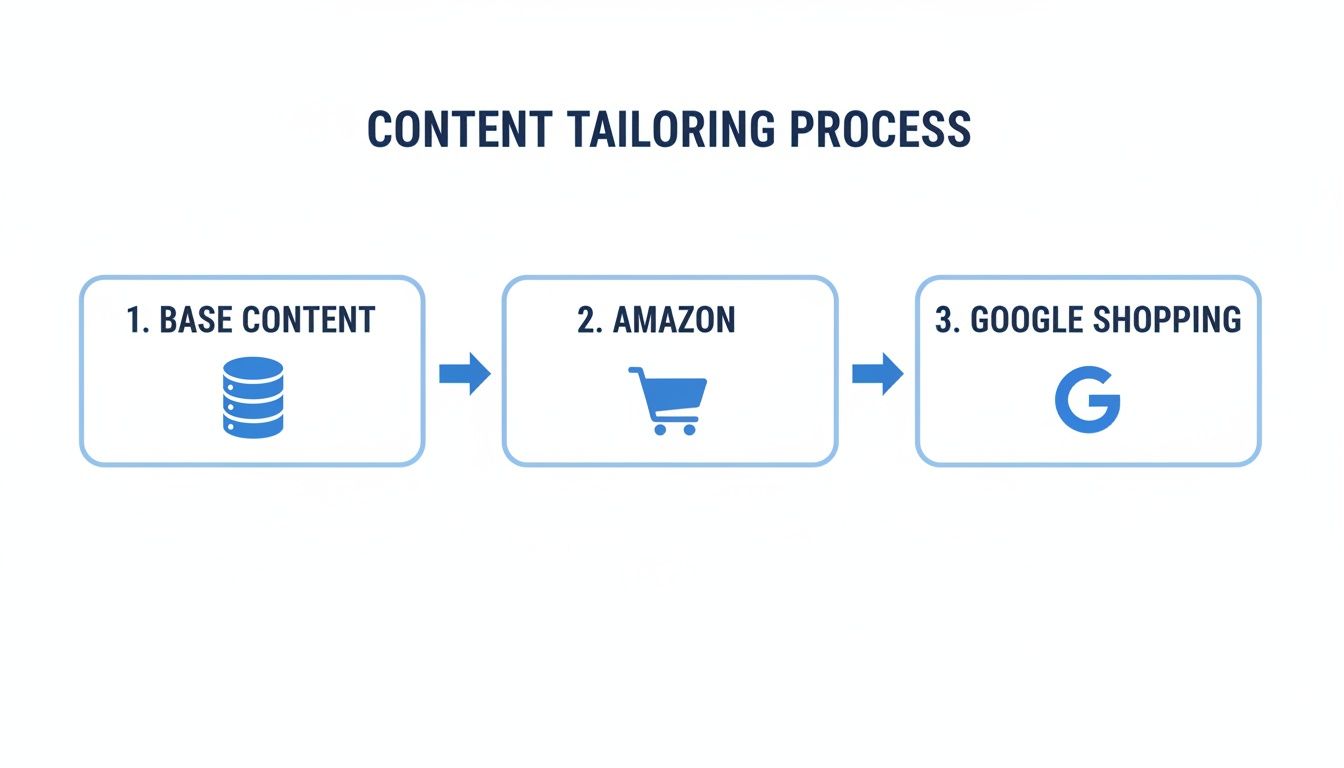
The flowchart above shows this in action. An AI-powered PIM takes your core product information and automatically adapts it for the unique demands of Amazon, Google Shopping, or any other channel, ensuring everything stays consistent and compliant.
The real breakthroughs happen when your PIM, DAM, and AI all live on the same platform. This creates a fluid workflow where your team can manage data, organize assets, and generate optimized content without juggling a half-dozen different tools.
AI isn't just about writing copy faster. It's about creating better, more consistent, and more effective content across every channel, which frees up your team to focus on strategy instead of mind-numbing tasks.
For example, an advanced platform like NanoPIM can pull in basic supplier data and automatically enrich it. The AI can then draft multiple product descriptions, score them for quality and SEO, and route them for a quick human review. A central hub like this gives teams a bird's-eye view of their entire catalog, making it easy to govern content, track what is missing, and keep the brand consistent everywhere you sell.
Beyond creating the content, AI is also making the product page experience smarter for the shopper. By analyzing user behavior, it can offer recommendations that actually make sense and help increase average order value.
Here are a few ways AI is enriching the page for customers:
By automating the heavy lifting and adding a layer of smart personalization, AI turns the static product page into a dynamic, helpful sales tool. This does not just save hundreds of hours of manual work, it creates a much better customer experience, which is what ultimately drives growth.
Even the most seasoned ecommerce pros run into questions when it is time to build out a new product page. Here are some of the most common ones we hear, along with straight-to-the-point answers based on what actually works.
This is the classic question, and while every piece matters, one thing stands above the rest: your product imagery and video. It’s the first thing a shopper sees and the single most powerful tool you have to build desire.
Before a customer reads a single word of your carefully crafted description, they’ve already made a snap judgment based on your visuals. If they are blurry, poorly lit, or do not show the product in the best light, you have lost the sale before you even had a chance. High-quality visuals do the heavy lifting, bridging the gap between shopping online and holding the product in their hands.
There is not a single magic number, but a good baseline is 5-8 high-quality images per product. That gives you enough real estate to show every angle and answer questions visually before they’re even asked.
A solid image gallery should always include:
The goal isn’t just to display your product; it's to eliminate any and all doubt about its size, feel, and function. A great set of images tells a complete story.
It needs to be long enough to persuade but short enough to be read. The best way to do this is with a simple two-part approach that works for both skimmers and detail-oriented shoppers.
First, hook them with a short, punchy paragraph of 2-3 sentences. This is not the place for specs; it is where you tell a quick story or highlight the single biggest benefit. Immediately follow that with a bulleted list of 4-6 key features and, more importantly, what those features do for the customer.
Reviews need to be in two places to have the biggest impact.
Both are fantastic ways to increase your average order value, but they work differently.
Upselling is about encouraging a customer to buy a better, more expensive version of the same product. Think of it as an upgrade.
Cross-selling is about suggesting related or complementary items that go with the product they’re already looking at.
Here’s how it plays out:
When placed strategically on your product page, both tactics can give your revenue a serious boost.
Ready to stop the manual grind and start creating high-quality product pages at scale? NanoPIM combines PIM, DAM, and AI into one powerful platform, turning raw product specs into channel-optimized content in minutes. See how it works and take control of your catalog today.


