

Your day probably starts with three tabs, six spreadsheets, a Slack message about missing product images, and someone asking why Amazon shows a different size chart than your own store.
Then problems escalate.
The ERP has one version of the product specs. Marketing has another in a shared doc. Your photos live in a folder system nobody fully understands. Variants were updated in Shopify, but not in the marketplace feed. A supplier just sent a new file, and now nobody’s sure what changed, what’s approved, or what should go live first.
That’s the point where a cloud data manager stops sounding like an IT term and starts sounding like relief.
For retail and eCommerce teams, this isn’t really about servers or infrastructure. It’s about getting one trusted place to manage product facts, media, updates, approvals, and publishing across channels without chasing files all day.
A common retail problem looks boring on paper and painful in practice.
You’ve got a new product line ready to launch. The buying team has specs in a spreadsheet. Creative has images in cloud storage. The marketplace team rewrites titles for Amazon. Your web team adds details in Shopify. A sales rep grabs an old PDF and sends the wrong dimensions to a wholesale partner.
Nothing is dramatically broken. But everything is slightly off.
That’s how teams end up with mismatched colors, duplicate SKUs, missing bullets, stale copy, and slow launches. Not because people aren’t working hard. Because the data lives in too many places.

When product data is scattered, a few patterns show up fast:
A cloud data manager fixes the root issue. It gives you one cloud-based place to organize product data, connect systems, track changes, and push the right information to the right channels.
Think of it as the operating hub for your catalog.
This isn’t a niche software trend. The global Cloud Based Data Management Services market reached $68.74 billion in 2025 and is projected to grow to $91.3 billion in 2026 at a 32.8% CAGR, with a projection of $286.72 billion by 2030, according to The Business Research Company’s cloud-based data management services report.
That growth makes sense. Retail teams are managing more products, more channels, more media, and more updates than old spreadsheet workflows can handle.
Practical rule: If your team spends more time hunting for product truth than improving product content, you’ve already outgrown ad hoc file management.
A good starting point is understanding how product records move between systems. This guide to a data integration platform helps connect that idea to the practical work of syncing commerce data.
A cloud data manager isn’t magic. It just gives your team something most catalogs are missing. Control.
People use the phrase cloud data manager in two different ways, and that mix-up causes a lot of confusion.
Sometimes they mean a person. Sometimes they mean software.
A Cloud Data Manager as a job title is the person who oversees how data is stored, organized, governed, and shared in cloud systems.
In retail, that person might sit in operations, IT, digital commerce, or data governance. They care about clean attributes, system connections, permissions, and keeping catalog changes from turning into channel errors.
They’re the traffic controller.
A cloud data manager as a platform is the software that gives everyone a shared system for handling product information and related assets in the cloud.
That’s the meaning most eCommerce teams care about.
This tool acts like a single source of truth for your product universe. It stores and organizes things like:
Think of your product catalog like a busy retail stockroom.
Without a cloud data manager, every team keeps inventory in different boxes with different labels. Someone writes over an old label. Someone else moves the box. Then launch week arrives and nobody trusts what’s inside.
With a cloud data manager, you get one labeled stockroom, one check-in process, and one way to see what’s current, what’s pending, and what’s approved.
That’s why this tool matters. It doesn’t just store data. It gives teams a shared operating model.
A spreadsheet can hold product data. It can’t reliably run a modern catalog across web, marketplaces, paid channels, and internal teams.
In day-to-day operations, the tool matters because it reduces the gap between systems and teams.
Merchandising wants complete attributes. Creative wants approved media. Marketplace managers want channel-ready copy. Operations wants cleaner imports from the ERP. Leadership wants fewer fire drills.
A cloud data manager gives those groups one place to work from instead of five disconnected ones.
In practice, modern retail platforms often bring together PIM behavior for structured product data and DAM behavior for media files. That combination is what makes the concept useful. You’re not just storing records. You’re building a complete, usable product record that people can trust. Its primary value is in the unification.
Once the basic definition clicks, the next question is simple.
What does a cloud data manager typically do?
The easiest answer is this. It helps retail teams centralize, control, connect, scale, and protect product data.
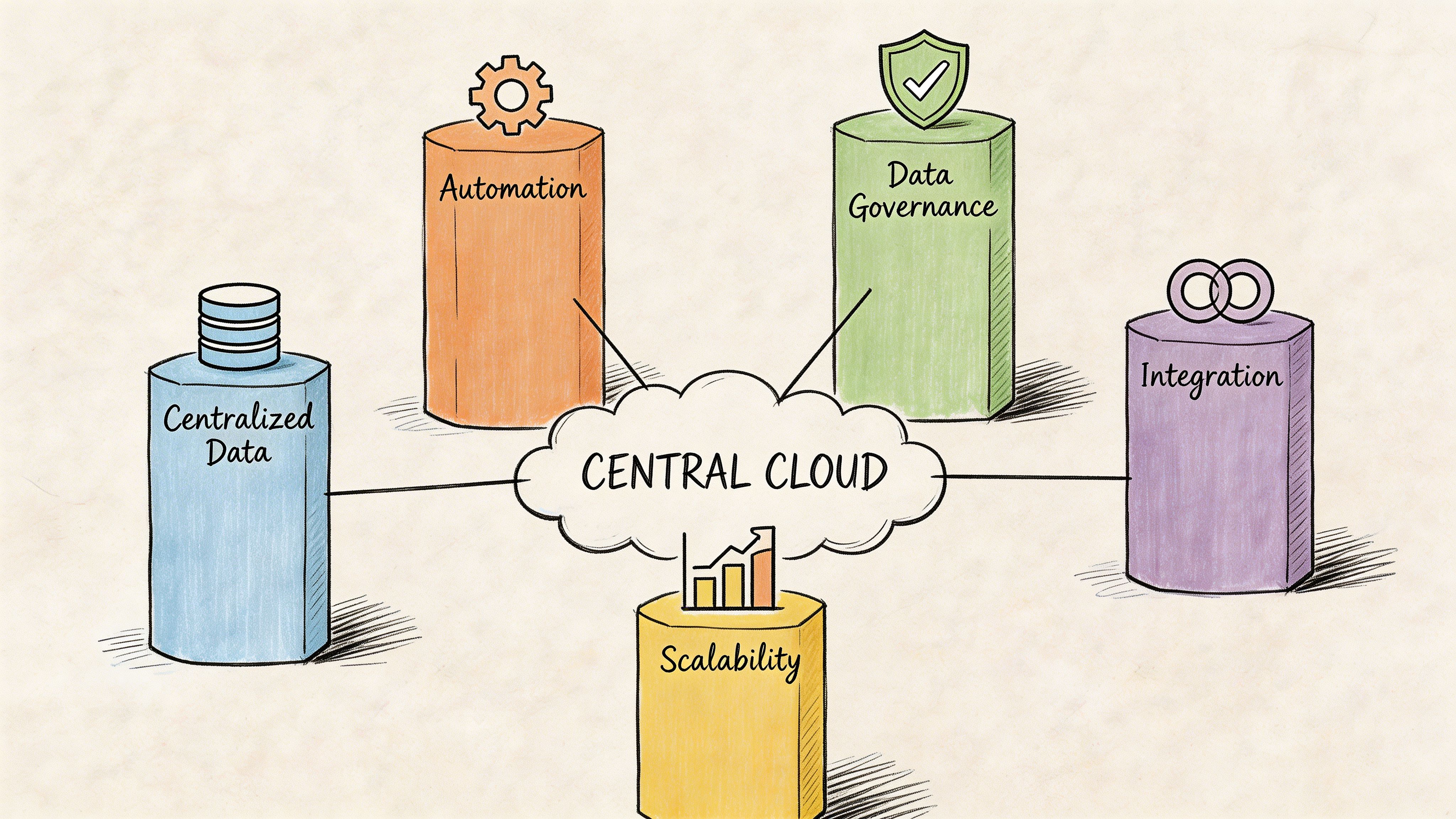
This is the core job.
A cloud data manager pulls scattered product information into one hub so your website, marketplaces, ads, and internal teams stop working from different versions of the truth.
If a size, material, or compatibility note changes, you update it once. Then the rest of the workflow can follow from that change.
For retail teams, this means fewer embarrassing mismatches between channels and less time spent asking which file is the latest one.
Governance sounds heavy, but it’s really just controlled change.
You need rules around who can edit what, who approves updates, and what happens before a record is published. That matters when junior staff, agencies, suppliers, and internal teams all touch the same catalog.
A solid cloud data manager supports version history, review steps, and safe comparison before merge. That’s especially useful when supplier feeds arrive with incomplete or conflicting details.
Field note: The best governance workflows don’t slow teams down. They stop avoidable mistakes from reaching the customer.
If the platform doesn’t connect to the rest of your stack, your team ends up doing copy-paste work in nicer software.
That’s why integrations matter so much. Modern Cloud Data Management Platforms offer pre-built connectors to over 100 sources like Salesforce and Amazon S3, can reduce custom engineering by 70 to 80%, and support versioned transformation pipelines that enable 10x faster iteration cycles, according to OvalEdge’s overview of cloud data management platforms.
For an eCommerce team, that can mean cleaner flows between ERP, storefront, marketplace feeds, and asset libraries. If you want to understand the mechanics behind those flows, this primer on a data pipeline ETL is a useful next step.
A small catalog can survive on messy processes longer than it should.
A large catalog can’t.
As soon as you add more variants, more suppliers, more regions, or more channels, hidden process cracks turn into daily operational drag. A cloud data manager gives you structure that can expand with the catalog instead of collapsing under it.
Here’s where teams usually feel that benefit first:
Retail teams don’t always think of product data as a security topic until the wrong person overwrites approved content or sensitive files end up in the wrong folder.
A cloud data manager helps by limiting access, tracking edits, and creating an audit trail. That matters for internal accountability and for working with external partners.
| Capability | What it means in plain English | Retail outcome |
|---|---|---|
| Centralization | One home for product facts and media | Fewer channel inconsistencies |
| Governance | Approval rules and version control | Less accidental publishing |
| Integration | Connections to ERP, commerce, and storage tools | Less CSV cleanup |
| Scalability | Structure that can handle growth | Easier expansion across channels |
| Security | Permissions and change tracking | Better control over edits |
A cloud data manager earns its keep when these capabilities work together, not separately.
Retail tech gets confusing fast because every tool arrives with an acronym and a promise.
The easiest way to sort them out is to stop asking which label sounds best and ask what kind of data each one is built to manage.
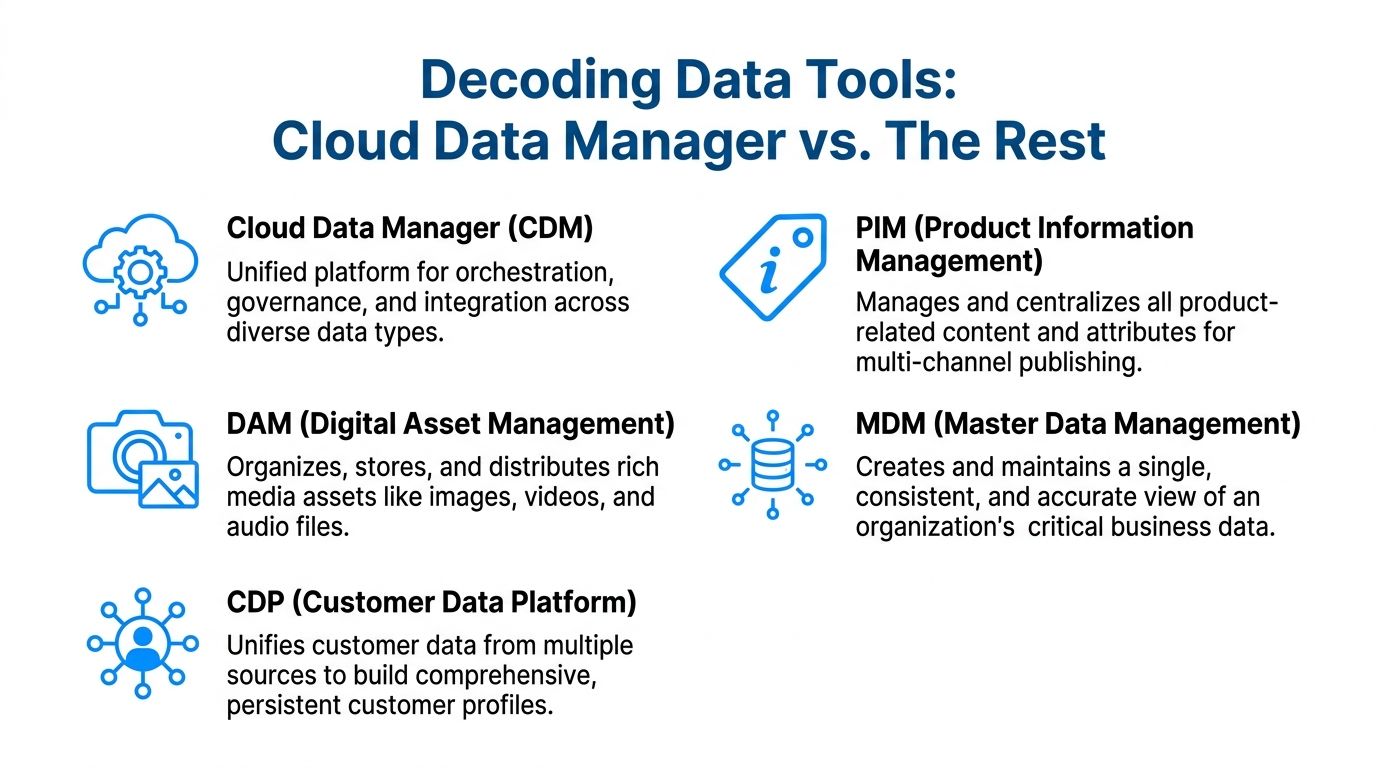
If your product were a person:
That last part matters.
A cloud data manager often overlaps with PIM and DAM in retail because product teams need one place to manage both structured product data and the media tied to it. Its primary value is in the unification.
| Tool | Primary Focus | Typical Data Type | Key Use Case |
|---|---|---|---|
| Cloud Data Manager | Orchestration, governance, and integration across systems | Mixed product, operational, and media-related data | Managing product data flow across channels and teams |
| PIM | Product information management | Attributes, specs, variants, descriptions | Creating accurate, channel-ready product records |
| DAM | Digital asset management | Images, video, manuals, brand files | Organizing and distributing creative assets |
| MDM | Master data consistency | Core business records across domains | Keeping business-critical records standardized |
| CDP | Customer profile unification | Behavioral and transactional customer data | Personalization and audience building |
A lot of buyers treat these categories like they’re mutually exclusive. In practice, they’re not.
A retail organization may use MDM at the enterprise level, a CDP for customer marketing, and a cloud data manager for product operations. The confusion happens when teams expect one tool to solve every data problem in the business.
It won’t.
What a cloud data manager does well is help product and commerce teams bring together the most operationally important pieces of product truth. That often includes PIM-style attribute management and DAM-style asset control in one workflow.
If your biggest pain is messy product launches, missing attributes, outdated images, and inconsistent channel listings, you’re usually looking at a product data problem, not a customer data problem.
That distinction saves time during software selection. It also keeps teams from buying a broad platform when what they really need is tighter control over the product record.
Theory is nice. Launch week is where the tool proves itself.
Here are the situations where a cloud data manager becomes useful fast.
Say your team is releasing a new line with many variants.
The buying team imports supplier specs. Content managers refine titles and descriptions. Creative uploads images and size guides. Marketplace teams need channel-specific fields for Amazon and eBay. Your website team needs the same core truth, but packaged differently.
Without a central system, each team edits its own version.
With a cloud data manager, one product record feeds many outputs. Teams can enrich once, approve once, and publish to multiple destinations without rebuilding the same listing repeatedly.
This is one of the most common pain points in retail operations.
A supplier sends revised dimensions, a safety note changes, or a discontinued color has to come off every channel quickly. If your process depends on manual updates in several tools, those corrections move slowly and inconsistently.
High-scale eCommerce environments show why this matters. In eBay’s ecosystem, cloud data management supports systems that process billions of events daily, handle peaks with 99.999% uptime, and use real-time inventory syncs and data merges through CI/CD pipelines that cut errors by 95%, as described in this eBay cloud data management reference.
You may not run at eBay’s scale, but the operating principle still applies. Updates need to move safely, quickly, and with traceability.
Search is no longer just a keyword game.
Teams now need richer product descriptions, cleaner attributes, better metadata, and more structured product context. That work gets harder when content is fragmented across systems.
A cloud data manager helps by keeping the raw material in one place. Product facts, media, compatibility notes, and marketing copy stay connected. That makes it easier to enrich product records and adapt them for search, marketplaces, and emerging AI experiences.
Sales, support, merchandising, paid media, and operations all need product information. They just need it in different ways.
A shared cloud system reduces the constant “Can you send me the latest version?” loop. People can find approved assets and current product facts without waiting on one catalog owner to manually package everything.
A cloud data manager won’t make product operations effortless. It does make them repeatable, which is usually what teams need most.
Buying the tool is the easy part.
Getting your catalog into shape is the main undertaking.
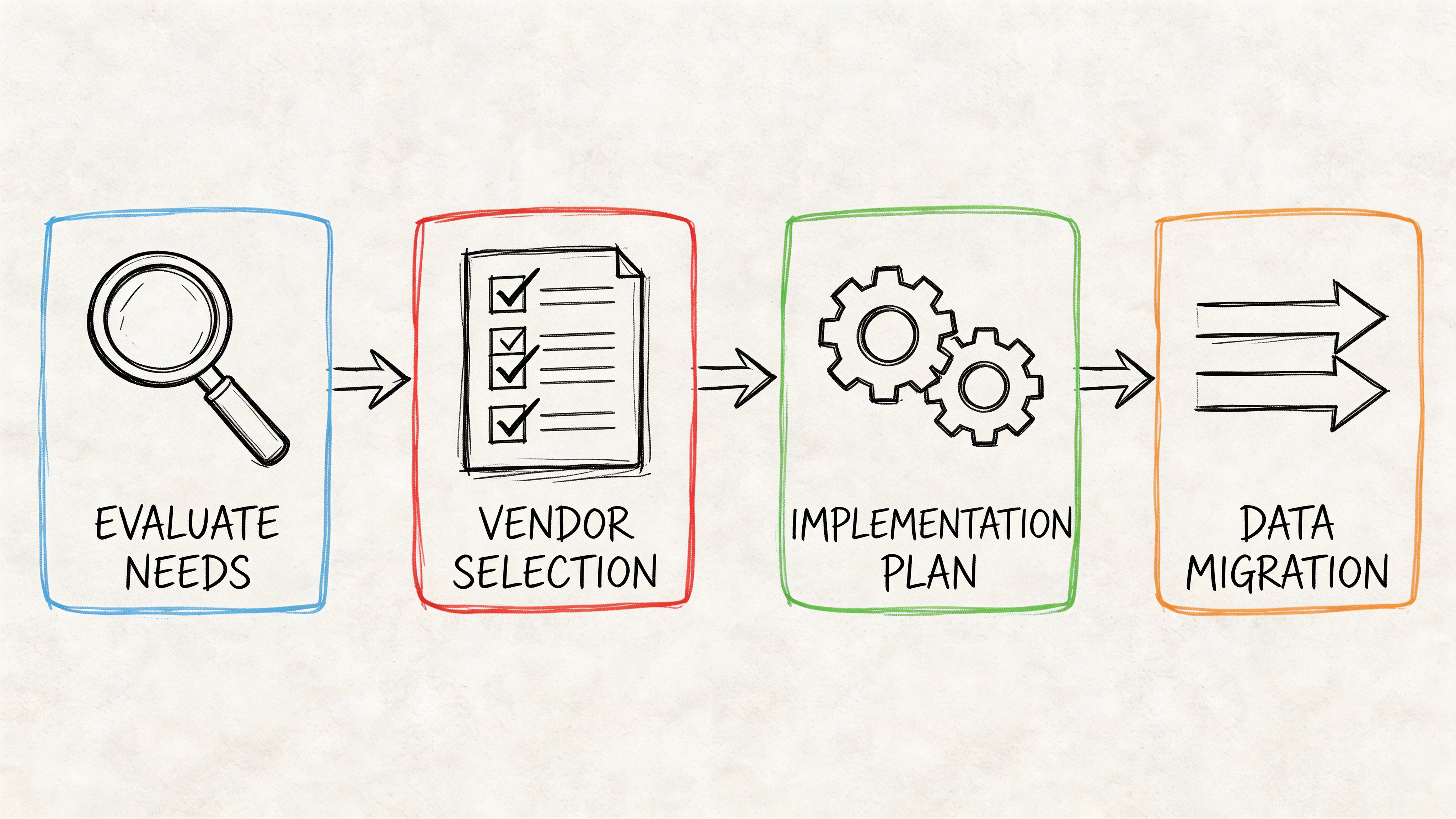
Start with your daily operating pain, not a giant feature checklist.
If your team manages product data across Shopify, marketplaces, ERP feeds, supplier files, and media folders, look for a platform that handles those realities cleanly. The right system should be easy for non-technical users, flexible enough for growing catalogs, and strong on review workflows.
A few practical filters help:
If you work in apparel or visual categories, it also helps to study adjacent tooling decisions. This roundup of essential fashion ecommerce solutions is useful because it shows how product content, imagery, and commerce workflows often need to work together.
Most rollout issues don’t come from the software.
They come from messy input data, unclear ownership, and trying to migrate everything at once.
Another challenge is unstructured content. According to Striim’s guide to cloud data management, 80% of enterprise data is unstructured, and 45% of organizations cite visibility and cost controls as top barriers. That matters in retail because product operations rarely involve only tidy rows and columns. Teams also manage images, PDFs, videos, packaging files, and supplier documents.
Clean structure beats heroic cleanup. If you move bad data into a better tool, you just get organized confusion.
List where product facts, assets, and channel copy currently live. Don’t skip old folders and supplier drop zones. They’re often where the surprises sit.
Agree on what a complete product record includes. Attributes, variants, images, documents, channel copy, status, owner, approval stage.
Start with one category, one brand, or one channel set. Prove the workflow before expanding.
Automation helps, but product data still needs review. A system should make approvals easier, not optional.
That last point matters more than people think. The best cloud data manager is the one your team can govern consistently, not the one with the loudest feature list.
A cloud data manager matters because retail teams don’t lose time on data volume alone. They lose time on data disagreement.
One system says the product is available in six colors. Another says five. The marketplace listing uses old copy. The sales deck has an outdated image. Everyone is working, but nobody is fully aligned.
Therefore, the primary goal isn’t just cloud storage. It’s a single source of truth your teams can trust.
By August 2024, 98% of U.S. organizations had adopted cloud technology, and 60% of the world’s corporate data was stored in the cloud, which is double the level from 2015, according to Software Oasis research on cloud data adoption. That tells you cloud platforms are no longer experimental. They’re normal operating infrastructure.
For eCommerce teams, the opportunity is bigger than cleanup. Once your product data is structured and governed, you can support better launches, better search visibility, cleaner marketplace execution, and stronger collaboration across teams.
If your organization is also reviewing outside growth partners, it helps to pair clean product data with smart search strategy. A practical guide on choosing an SEO company can help teams evaluate that side of the equation more clearly.
And if your product operations are broadening into governance across systems, this overview of master data management solutions is a useful next read.
A clean catalog used to be a nice operational advantage.
Now it’s the foundation for competing across marketplaces, brand sites, and AI-shaped discovery.
If your team is ready to stop managing products through scattered spreadsheets, disconnected folders, and risky manual updates, take a look at NanoPIM. It brings product data, variants, media, review workflows, and AI-assisted enrichment into one place so you can build a catalog your whole team can trust.


